
Getting music or calls from your phone to your car stereo used to mean tangled wires or old CDs. Today, Bluetooth changes everything. With Bluetooth, you can stream songs, answer calls hands-free, and even use your favorite apps—all without plugging in. But while the idea sounds simple, connecting Bluetooth to a car stereo can confuse many drivers, especially if English is not your first language.
This guide shows you exactly how to connect Bluetooth to your car stereo. You’ll learn the different ways Bluetooth works in cars, step-by-step instructions for every method, and how to fix common problems. Whether your car is new or old, you’ll find clear advice to get your phone and stereo talking to each other.
If you want music, podcasts, and clear calls in your car, read on.
Understanding Bluetooth And Car Stereos
Bluetooth is a wireless technology that lets devices connect and share information without cables. In cars, Bluetooth lets your phone and stereo exchange music, phone calls, and more.
There are three main ways Bluetooth connects to car stereos:
- Built-in Bluetooth: Many modern cars have Bluetooth built into the stereo. You only need to pair your phone.
- Bluetooth adapters: For cars without Bluetooth, you can add it using an adapter. These plug into the stereo or cigarette lighter.
- Aftermarket Bluetooth stereos: You can replace your old stereo with a new one that has Bluetooth.
Each method has its own steps, benefits, and limits. Knowing which you have is important before you start.
Bluetooth Versions And Compatibility
Bluetooth comes in different versions. Most car stereos use Bluetooth 4.0 or later. Newer versions are faster and work better with modern phones. If your phone uses Bluetooth 5.0 and your car uses 4.0, they can still connect—but you might not get the fastest speeds.
Some older cars have Bluetooth only for calls, not music. Check your car’s manual or settings to see what it supports.
Connecting Bluetooth To A Built-in Car Stereo
If your car already has Bluetooth, connecting is usually simple. Here’s how to do it:
Step-by-step Guide
1. Turn On Bluetooth On Your Phone
Go to your phone’s settings and turn on Bluetooth. Make sure your phone is visible to other devices.
2. Start Your Car And Stereo
Make sure the car stereo is powered on. Some cars require you to be parked for pairing.
3. Access Bluetooth Settings On The Car Stereo
Look for a button labeled “Bluetooth,” “Phone,” or “Pair. ” If you don’t see one, check the stereo menu.
4. Search For Devices
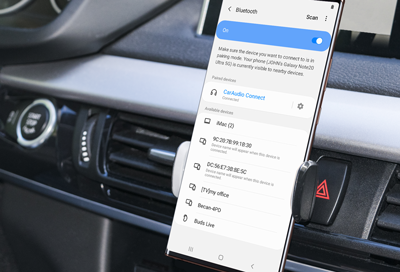
On your car stereo, select the option to search or add a new device. On your phone, look for your car’s name in the Bluetooth list.
5. Pair The Devices
Select your car stereo’s name on your phone. You may need to enter a code (usually “0000” or “1234”). Some cars show a code on the screen—make sure it matches.
6. Confirm Connection
When paired, your phone may ask for permission to share contacts or audio. Accept these if you want full features.
7. Test The Connection
Play music or make a call to check if the sound comes through the car speakers.
Practical Example
Let’s say you have a Toyota Camry with built-in Bluetooth. After turning on Bluetooth on your phone and the stereo, you access the “Setup” menu on the car, choose “Bluetooth,” and select “Add New Device.” Your phone finds “Camry Audio,” you select it, enter the code shown on the car screen, and they pair.
Common Mistakes
- Not making your phone visible to other devices
- Entering the wrong pairing code
- Trying to pair while driving (some cars block pairing unless parked)
- Forgetting to accept permissions
Credit: headsetstore.global-teck.com
Using A Bluetooth Adapter For Cars Without Bluetooth
Many older cars do not have built-in Bluetooth. You can add Bluetooth with an adapter. There are several types:
- FM transmitter adapters: Plug into the cigarette lighter; send Bluetooth audio to your car via FM radio.
- Aux-in adapters: Connect to the stereo’s AUX input.
- USB/Bluetooth dongles: Plug into USB if your stereo supports it.
How Bluetooth Adapters Work
Bluetooth adapters receive the signal from your phone and send it to the car stereo. Some adapters also let you take calls hands-free.
Here’s a comparison of common Bluetooth adapter types:
| Adapter Type | Connection Method | Audio Quality | Supports Calls? | Price Range |
|---|---|---|---|---|
| FM Transmitter | Cigarette lighter + FM radio | Medium | Yes | $15-$40 |
| Aux-In Adapter | AUX input | High | Yes | $20-$50 |
| USB Dongle | USB port | High | No/Yes (varies) | $10-$30 |
Step-by-step Guide For Bluetooth Adapter
1. Choose The Right Adapter
Check your car stereo for an AUX, USB, or FM radio option. Buy an adapter that matches.
2. Plug In The Adapter
Insert the adapter into the correct port (AUX, USB, or cigarette lighter).
3. Turn On Bluetooth On Your Phone
Make sure Bluetooth is enabled and visible.
4. Pair Your Phone With The Adapter
Find the adapter’s name in your phone’s Bluetooth list. Select it and enter the pairing code if needed.
5. Tune To The Right Channel (for Fm Adapters)
Set your car radio to the channel shown by the adapter (example: 88.1 FM).
6. Play Audio To Test
Play music or make a call to check that sound comes through the car speakers.
Tips For Best Results
- For FM transmitters, pick a channel with no radio stations for clear sound.
- Aux adapters usually give better sound than FM transmitters.
- Some adapters have microphones for hands-free calls—place them close for better quality.
Installing An Aftermarket Bluetooth Stereo
If your car stereo is very old, or you want better features, you can install a new stereo with Bluetooth. This option is more expensive but gives you modern controls.
What You Need
- A compatible stereo for your car’s make and model
- Installation tools (screwdriver, wire connectors)
- Wiring harness (to connect the new stereo to your car)
Installation Steps
1. Buy The Right Stereo
Check your car’s model and dashboard size. Choose a stereo that fits and supports Bluetooth.
2. Remove The Old Stereo
Disconnect the car battery. Take out the old stereo using the proper tools. Don’t force anything.
3. Connect The New Stereo
Use the wiring harness to match the wires. Connect power, speakers, and any antennas.
4. Secure The Stereo In The Dashboard
Make sure the stereo fits and is screwed in tightly.
5. Reconnect The Battery And Turn On
Test the new stereo. Access Bluetooth settings and pair your phone.
Advantages
- Better sound and features
- Supports modern apps (Apple CarPlay, Android Auto)
- Hands-free calling and music streaming
Cost And Value
Installing a new Bluetooth stereo can cost $100-$500 for the stereo, plus $50-$200 for installation. If you do it yourself, you save on labor costs.
Here’s a quick comparison of Bluetooth options:
| Bluetooth Method | Ease of Use | Features | Cost |
|---|---|---|---|
| Built-in Bluetooth | Very easy | Calls, music, contacts | Included with car |
| Bluetooth Adapter | Easy | Music, calls (varies) | $10-$50 |
| New Stereo | Medium/difficult | Modern apps, high quality | $150-$700 |
Troubleshooting Bluetooth Connection Problems
Sometimes Bluetooth won’t connect or sound is poor. Here are common problems and how to fix them.
Common Issues
- Pairing fails: Devices won’t connect or don’t find each other.
- Poor sound quality: Music sounds weak or noisy.
- Calls don’t work: Can’t hear or talk during phone calls.
- Bluetooth disconnects: Connection drops during use.
Solutions
1. Restart Devices
Turn off and on your phone and car stereo. This fixes many problems.
2. Delete Old Devices
If your car stereo has many paired devices, remove some. Most stereos allow only 5-10 devices.
3. Update Software
Check for updates on your phone or car stereo. Newer software fixes bugs.
4. Move Closer
Bluetooth works best within 30 feet. Move your phone closer to the stereo.
5. Check Interference
Other wireless devices (Wi-Fi, wireless cameras) can cause problems. Turn them off if possible.
6. Reset Bluetooth Settings
On your phone, reset Bluetooth settings if nothing works.
Real Example
A driver has a Honda Civic and can’t connect Bluetooth. After deleting old paired devices from the stereo and restarting the phone, the connection works again.
Safety And Privacy Tips
Bluetooth in cars is convenient, but you need to use it safely.
- Don’t pair while driving: Only set up Bluetooth while parked.
- Use hands-free calls: Keep your hands on the wheel.
- Lock your phone: Some cars download contacts; make sure your phone is secure.
- Delete old devices: If you sell your car, remove your phone from the stereo.
Advanced Features And Insights
Bluetooth is more than basic music and calls. Many cars and stereos offer extra features:
Multipoint Pairing
Some stereos let you connect two phones at once. For example, a family car can have both parents’ phones paired. Not all stereos support this—check your manual.
Voice Commands
Modern Bluetooth systems support voice control. You can say “Call John” or “Play music” to control the stereo. This makes driving safer.
Bluetooth Audio Codecs
Bluetooth uses different audio codecs for sound quality. Most cars use SBC (standard quality). Some support AAC or aptX for higher-quality music. If you care about sound, check your stereo’s codec support.
Automatic Reconnection
After pairing, your phone should reconnect automatically. If it doesn’t, make sure Bluetooth is on and your phone isn’t paired with another device.
Example Of Non-obvious Insight
Many users don’t realize that turning off Bluetooth on your phone can save battery life. If your phone is low on power, disable Bluetooth until you need it. Also, pairing your phone with several cars can cause confusion—remove any unused connections.
How To Choose The Best Bluetooth Option For Your Car
Choosing the right Bluetooth solution depends on your car, budget, and needs.
Key Factors
- Car age and model: Newer cars usually have Bluetooth built-in.
- Stereo type: Check if your stereo has AUX, USB, or only FM radio.
- Budget: Adapters are cheaper; new stereos cost more but offer extra features.
- Desired features: Music streaming, hands-free calls, app support.
Comparison Table
Here’s a simple comparison to help you decide:
| Need | Best Option | Estimated Cost | Setup Time |
|---|---|---|---|
| Basic music streaming | FM transmitter | $15-$40 | 5-10 min |
| High-quality audio | Aux-in adapter or new stereo | $20-$700 | 10-60 min |
| Hands-free calling | Built-in Bluetooth or adapter with mic | $0-$50 | 5-20 min |
| Modern apps | New Bluetooth stereo | $150-$700 | 1-2 hours |
Credit: www.samsung.com
Real-world Statistics And Examples
- By 2023, over 85% of new cars sold in the US have built-in Bluetooth.
- Bluetooth adapters are one of the most popular car accessories, with over 2 million units sold annually.
- Most drivers report that streaming music improves their driving mood and attention.
- Cars with Bluetooth are valued about $300 higher on average in used car sales.
Expert Tips For A Smooth Bluetooth Experience
- Pair only when needed: Don’t leave Bluetooth on if you don’t use it daily.
- Update your devices: New updates fix bugs and improve connection.
- Choose adapters with noise reduction: This improves call and music quality.
- Check stereo compatibility before buying: Don’t waste money on the wrong adapter.
- Test before driving: Make sure everything works before you start your trip.

Credit: www.youtube.com
Frequently Asked Questions
How Do I Know If My Car Stereo Has Bluetooth?
Check your car stereo for a Bluetooth logo or a button labeled “Bluetooth” or “Phone.” You can also look in the stereo menu or the car’s manual. If you see options to pair a device, Bluetooth is built-in.
Can I Add Bluetooth To Any Car?
Yes, almost any car can use Bluetooth with an adapter. Choose an adapter that matches your stereo’s input (AUX, USB, or FM). For cars with no AUX or USB, an FM transmitter is usually the best option.
Why Won’t My Phone Connect To My Car’s Bluetooth?
Common reasons include:
- Bluetooth is off on your phone or car
- Too many devices paired with the stereo
- Outdated software
- Wrong pairing code
Try restarting both devices, deleting old connections, and updating software.
Is Bluetooth Audio Quality As Good As Wired Connections?
Bluetooth audio is usually good, but wired connections (like AUX or USB) can be better. High-quality Bluetooth adapters and modern stereos use codecs that improve sound. If you care about music quality, choose an adapter with aptX or AAC support.
How Do I Remove My Phone From My Car’s Bluetooth?
Go to your car stereo’s Bluetooth settings. Find the list of paired devices and select your phone. Choose “Delete” or “Remove.” On your phone, you can also “Forget” the car stereo in Bluetooth settings.
Connecting Bluetooth to your car stereo makes your driving experience safer and more enjoyable. Whether your car is new or old, there’s a solution that fits your needs. Take the time to choose the right method, follow the steps carefully, and enjoy music, calls, and more—without wires or hassle. For more details on Bluetooth technology, see Wikipedia.

Leave a Reply