
Few things are more frustrating than plugging in an OBD2 scanner and getting nothing — no power, no connection, no codes. You're ready to diagnose your car's problem, and suddenly the diagnostic tool itself is the problem Wheeler.
The good news: most OBD2 scanner failures are simple to fix. In many cases you don't need to buy a new scanner or visit a mechanic — you just need to methodically work through the right checks. This guide covers every common cause, gives you a step-by-step process to get your scanner working again, and tells you honestly when it's time to replace the tool or call in a professional. For more on this, see our guide on why is my car stereo not working.
What an OBD2 Scanner Actually Needs to Work
An OBD2 scanner is essentially a small computer that connects to your vehicle's onboard diagnostics port — that trapezoid-shaped connector usually tucked under the dashboard on the driver's side. It reads engine trouble codes, monitors live sensor data, and helps you understand what the car's computer is saying.
For any scanner to function, three things must all be working:
- Power — the port must supply 12V from your vehicle's electrical system through a fuse.
- A clean data connection — the metal pins inside the port must make proper contact.
- A compatible protocol — the scanner and vehicle must speak the same communication language.
Break any one of these links, and you'll see symptoms like a blank screen, "No Connection," or error messages that make no sense. Most troubleshooting comes down to checking these three areas in order. For more on this, see our guide on what is vpwr on obd2 scanner.

Credit: konnectgps.com
The OBD2 port sits under the dashboard, normally within arm's reach of the driver's seat.
Why Your Scanner Stops Working: 5 Common Culprits
1. Power Supply and Fuse Problems
The #1 reason an OBD2 scanner won't turn on is a power issue — and the usual cause is a blown fuse. Your OBD2 port draws power from the fuse box, and in many vehicles that fuse is labeled "CIG" (cigarette lighter) or, on newer cars, directly as "OBD."
Check the fuse box before you do anything else. A blown fuse is visibly broken inside — the metal strip inside the plastic housing will be separated. Replacing it costs a few dollars and takes under a minute. For more on this, see our guide on can an obd2 scanner detect transmission problems 2.
| Fuse Status | OBD2 Port Power | Scanner Behavior |
|---|---|---|
| Good | Active | Powers on and communicates |
| Blown | No power | Completely dead — no lights, no screen |
| Loose or corroded | Intermittent | Works sometimes, dies when nudged |
In practice, many DIYers assume their scanner is broken when the real problem was always the fuse. Always pull the fuse, inspect it under good light, and replace it if there's any doubt.
A second power concern is battery voltage. If your car battery is weak — below around 11.5 volts when the car is off — the OBD2 port may not provide enough power for the scanner to operate. Try starting the engine or using a jump box before condemning the scanner. For more on this, see our guide on car stereo screen not working.
2. Compatibility and Protocol Issues
Not every scanner works with every car. Since model year 1996, all US market vehicles have been required to support OBD2, but the communication protocol underneath isn't universal. Your car might use one of several standards:
- CAN (Controller Area Network) — the most common since around 2008
- ISO 9141 / KWP2000 — frequently found on European and Asian vehicles
- J1850 — sometimes used on older Ford and GM models
Today, in 2026, essentially every gasoline vehicle sold in the US uses the CAN protocol, which is why entry-level scanners can be so cheap. But if you have an older vehicle, a European import, or a basic scanner that only supports CAN, you may get a "No Communication" message.
| Scanner Type | Best For | Protocols Supported |
|---|---|---|
| Basic code reader | US cars, 2008 and newer | CAN only |
| Mid-range scanner | Most 1996+ vehicles | CAN, ISO9141, KWP2000 |
| Professional / OEM tool | All vehicles, including heavy-duty | All protocols |
| Bluetooth + phone app | Depends entirely on the app | Usually CAN, sometimes more |
A common mistake: buying a budget Bluetooth OBD2 adapter and expecting it to read every parameter on a 2010 German sedan. Many inexpensive adapters only support a narrow range of protocolscars. Check the product specifications against your car's documented protocol before purchase. For more on this, see our guide on how to clear codes with obd2 scanner.
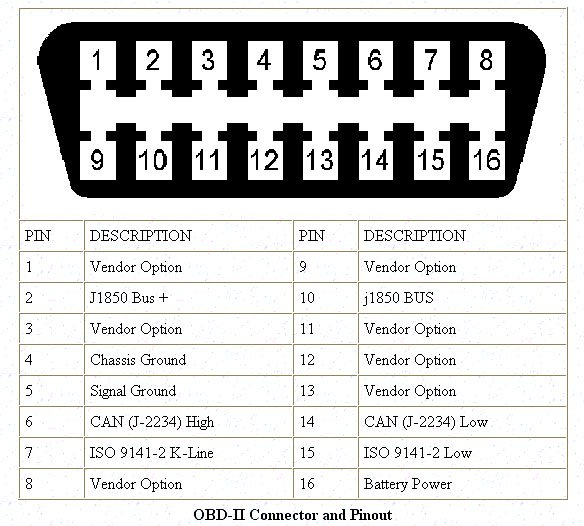
Credit: www.fs1inc.com
When the scanner and vehicle protocols don't match, you'll see a "No Communication" error on the screen.
3. Dirty or Damaged Port Connections
Even if your scanner powers on, it might fail to establish a data link because the port itself has a physical problem. Over the years, dust, moisture, and general cabin grime can build up on the pins. Sometimes debris from spilled drinks or pet hair finds its way into that recessed connector.
Inspect the port with a flashlight. Look for:
- Bent pins — a single bent pin can kill the data connection entirely
- Corrosion — greenish or white buildup on the metal contacts
- Loose mounting — a port that wiggles when you touch it may have broken solder joints behind the panel
To clean the pins, use compressed air followed by a dry, soft brush (a clean toothbrush or nylon brush works well). For stubborn corrosion, a tiny amount of electrical contact cleaner on a cotton swab is safe — but never use metal tools or anything abrasive.
One subtle detail: if your port is loose and the pins look fine, the wiring harness behind the port may have worked loose. Carefully push the connector back into place, or check the mounting screws.
4. Software, Bluetooth, and App Glitches
Bluetooth OBD2 scanners are convenient, but they introduce a whole set of software problems. If your scanner powers up and pairs but the app says "No Data" or times out, check these:
- Update the app — most scanning apps receive regular updates to handle new vehicle models and Android/iOS changes. Running an outdated version is one of the most common causes of bizarre connection failures.
- Check Bluetooth pairing — on some phones, the adapter must be paired in the system settings first; on others, the app handles it. If you have multiple Bluetooth devices connected, disconnect them all and try again.
- Verify app permissions — iPhone users: the app needs Bluetooth permission in Settings. Android users: make sure location permission is granted, since Bluetooth scanning often requires it.
- Clear your phone's Bluetooth cache — sometimes old pairing data causes conflicts. Forget the device, restart the phone, and pair from scratch.
Restarting your phone and the car (turning the ignition off and on) resets most temporary glitches. When in doubt, reboot everything.
5. Hardware Faults and Counterfeit Scanners
Sometimes the scanner genuinely is broken. Dropping a handheld unit on concrete, leaving it in a hot car, or exposing it to moisture can damage internal components. Advanced scanners with firmware also occasionally need updates — check the manufacturer's website for the latest version.
The bigger issue, in my experience, is low-quality or counterfeit clones sold on marketplaces. A generic OBD2 adapter that costs a few dollars may appear to work at first but fail intermittently, freeze mid-session, or refuse to communicate with certain vehicles.
| Scanner Quality | Reliability | Manufacturer Support |
|---|---|---|
| Official brand (Bosch, Autel, BlueDriver, etc.) | High | Full support, firmware updates |
| Generic clone | Low | Limited or no support |
| Used / unknown condition | Variable | Usually none |
If your scanner is old, you dropped it, or it was suspiciously cheap, replacement might be the smartest move — but only after you've ruled out the other causes below.
Step-by-Step Troubleshooting Guide
Work through these steps in order. Each one eliminates a category of problems.
- Turn the ignition key to the "ON" position (not just "ACC," and not the engine running, depending on the car — many scanners work with the key at "ON"). Wait a few seconds.
- Check the scanner powers on. No lights? No screen? Go to the fuse box and check the fuse for the cigarette lighter/OBD port APA.
- Inspect the OBD2 port visually. Look for bent pins, dirt, or corrosion. Clean with compressed air if needed.
- Test the scanner on another vehicle. This is the single most revealing test. If it works on a different car, your car's port or wiring is the issue. If it fails there too, it's the scanner.
- For Bluetooth scanners: put the adapter in pairing mode, restart your phone, and re-pair. Update the app. Try a different compatible app like a second opinion.
- Check the protocol list in your scanner's manual against your car's documented protocol. When in doubt, search the scanner model plus your car make/model.
- Wiggle the connector gently while the scanner is active. A momentary connection indicates loose pins or wiring.
- If nothing works, replace the cable (for wired units) or the scanner itself — but only after step 4 confirmed the unit is the problem.

Credit: www.youtube.com
A working scanner shows live data and trouble codes almost instantly once communication is established.
A Practical Example
Imagine you have a 2010 Toyota Camry and a basic OBD2 scanner. It won't power on at all. You instinctively assume the scanner is dead — but the fuse labeled "CIG" in the interior fuse box is blown. A $2 fuse replacement restores power and the scanner works perfectly.
That's not a rare scenario; it's one of the most common resolutions in real-world troubleshooting. The takeaway: never skip the fuse check.
Hidden Details Beginners Usually Miss
Even when the scanner powers on|, communication can fail for subtle reasons. These catch people out more than they expect:
- Ignition position matters. Some cars require the key in the "ON" position before the OBD2 port is active. Others need the engine running. Test both.
- Aftermarket electronics cause interference. Installing an aftermarket stereo, alarm system, or dash cam with sloppy wiring can disrupt the OBD2 data bus. If your car recently had new electronics installed, that's a prime suspect.
- The scanner needs time to "wake up". Some vehicles only power the OBD2 port after the car's computer completes its startup sequence. Give it 20–30 seconds with the key at "ON" before concluding there's a fault.
- Data loss can be silent. If a wire in the harness is fraying, the scanner may connect but return garbled or no data. This can look like a scanner problem when it's actually a wiring problem.
When to Replace Your Scanner vs. When to Call a Pro
Replace the scanner if:
- It fails on two or more different cars (confirmed by step 4 above)
- It's a cheap clone with no manufacturer support
- The cable is damaged or the screen is cracked
- It's more than 10 years old and doesn't support your vehicle's protocol
Call a professional if:
- Your scanner works elsewhere, but won't connect to your car
- The port has physical damage or bent pins you can't fix
- You suspect broken wiring behind the port
- The car has complex electronics, a recent accident, or recent water damage
An auto electrician with a professional-grade scan tool can test the OBD2 wiring directly and pinpoint faults that consumer scanners can't.
Choosing a Reliable OBD2 Scanner
If your troubleshooting ends in replacement, don't repeat the same mistake. Buy a scanner with:
- Broad protocol support — CAN plus ISO9141 and KWP2000 covers essentially all 1996+ vehicles
- A well-known brand with active support and firmware updates
- Features that match your needs — basic code reading is fine for most; live data and ABS/airbag reading are worth it if you do your own maintenance
- Good app integration — for Bluetooth models, read recent app store reviews before purchase
For an authoritative background on the OBD2 standard itself, the U.S. Environmental Protection Agency publishes technical materials on onboard diagnostics requirements, which can help you understand exactly what your scanner needs to handle.
Keeping Up with Routine Car Care
Once your diagnostics are working again, it's a good moment to catch up on other simple maintenance you may have been putting off. A clean cabin isn't just about looks — dust and debris find their way into every recess, including areas like the port and under the seats. If you've been meaning to do a full interior clean, check out practical tips on keeping the cabin tidy. And if your current vacuum struggles with car interiors, it's worth choosing a vacuum that fits your needs — the right suction power makes a noticeable difference, and knowing which features are actually worth it saves you money.
Frequently Asked Questions
Why won't my OBD2 scanner turn on?
Check three things in order: the physical connection (make sure the plug is fully seated), the fuse for the OBD2 port (usually labeled "CIG" or "OBD"), and the ignition position. Many cars don't power the port unless the key is turned to "ON." If the fuse is fine and the key is at "ON" but the scanner still won't light up, test the scanner on another vehicle.
Can I use an OBD2 scanner on any car?
On any US-market gasoline vehicle from 1996 onward, yes — but not every scanner supports every protocol. European and Asian cars may use different communication standards. Check the scanner's protocol list against your vehicle's requirements. For 2008 and newer cars, CAN protocol support is almost always sufficient.
Why does my Bluetooth OBD2 scanner fail to connect?
Common causes include an outdated app, improper Bluetooth pairing, conflicting paired devices, or a protocol mismatch. Update the app, restart your phone, delete and re-pair the adapter, and confirm the ignition is in the correct position. If you have other Bluetooth devices connected, disconnect them temporarily.
What does "No Connection" or an error code mean?
It means the scanner sent a request and the car's computer didn't respond. The cause is usually a dirty or damaged port, a loose connection, a blown fuse, or a protocol mismatch — not a dead scanner. Work through the troubleshooting steps above, starting with the physical connection and the fuse.
How do I know if my OBD2 port is faulty?
If the scanner works on another car but not yours, suspect the port. Look for bent pins, corrosion, or loose mounting. If the port looks fine visually, the wiring behind it may be the problem — that requires an auto electrician to diagnose properly.
Conclusion
A dead or unresponsive OBD2 scanner is rarely a dead end. In most cases, the fix is a blown fuse, a dirty port, a mispositioned key, or a software glitch — all of which you can resolve at home in under ten minutes without spending a dimeasiest.
The smartest troubleshooting habit is simple: test the scanner on another car first. That single step tells you whether the problem is the tool or the vehicle, and it guides everything else you do.
Once you've confirmed your scanner works, put it to use — run a full vehicle health check this weekend and fix any codes while they're still cheap to address. And if you're serious about handling your own maintenance, you'll find more step-by-step help in the full library of car-care guides on the MotorRankings blog.

Leave a Reply