
When your check engine light pops on, you face a choice: pay a mechanic hundreds of dollars for a diagnosis, or try to figure it out yourself. Most drivers grab an OBD2 scanner, read the trouble code, and start replacing parts blindly. That approach wastes money and time.
There's a better way. Freeze frame data gives you a precise snapshot of your engine's operating conditions at the exact moment a fault occurred. Think of it as the black box from an airplane — it records what was happening right before the problem started. This information can turn a frustrating guessing game into a targeted, efficient repair. You can also read our guide on how to find hidden engine problem in obd2 scanner.
In this guide, you'll learn what freeze frame data is, how to read it, what each parameter means, and how to use it to fix your car faster. You'll also discover common mistakes to avoid and which scanners actually deliver this feature effectively.
What Is Freeze Frame Data?
Freeze frame data is a recording of your vehicle's sensor readings and engine parameters captured at the moment the ECU detects a malfunction strong enough to trigger a diagnostic trouble code (DTC). The car's computer saves this information alongside the fault code, giving you a detailed picture of the conditions under which the problem occurred.
Here's a simple analogy: imagine your car's computer is a security camera. When something suspicious happens, it takes a still photograph of everything it can see at that instant. That photograph includes engine RPM, vehicle speed, coolant temperature, fuel trim values, throttle position, and dozens of other sensor readings.
The key difference from live data is timing. Live data updates continuously as you drive — it shows what's happening right now. Freeze frame data is fixed; it shows exactly what was happening at the moment the check engine light triggered. This snapshot remains stored in the ECU's memory until you clear it.
Why Freeze Frame Data Matters
Freeze frame data is valuable because many car problems only appear under specific conditions. A misfire might only happen when the engine is cold. A lean fuel condition might only occur at highway speeds. Without freeze frame data, you'd need to replicate those exact conditions to diagnose the problem — a frustrating, time-consuming process.
With a freeze frame, you instantly know:
- Was the engine hot or cold?
- Was the car idling, cruising, or accelerating?
- Was the AC running?
- Was the fuel system correcting for a lean or rich condition?
This information narrows down the possible causes dramatically. Instead of looking at 15 potential causes for a misfire code, you might reduce it to 3 or 4.
What Parameters Are Included in Freeze Frame Data?
Not all vehicles record the same parameters in their freeze frame data. However, the OBD-II standard requires certain parameters to be captured for emissions-related codes. Here's what you'll typically see:
| Parameter | What It Tells You | Normal Range |
|---|---|---|
| Engine RPM | How fast the engine was turning | 650-700 rpm idle, 1,500-3,000 rpm driving |
| Vehicle speed | Whether the car was moving or stopped | 0 mph to highway speeds |
| Engine coolant temperature | Operating temperature at fault | 190-220°F (88-105°C) when warm |
| Fuel trim (short and long term) | How much the computer adjusts fuel delivery | -10% to +10% |
| Throttle position | How far the accelerator was pressed | 0-100% |
| Intake air temperature | Temperature of air entering the engine | Ambient to 140°F (60°C) |
| Mass air flow (MAF) rate | Volume of air entering the engine | Depends on engine size and RPM |
| Oxygen sensor voltage | Air-fuel mixture ratio | 0.1V (lean) to 0.9V (rich) |
| Barometric pressure | Atmospheric pressure at your location | 25-31 inHg depending on altitude |
Some vehicles, particularly European models, store additional parameters like turbocharger boost pressure, fuel rail pressure, or battery voltage. Luxury and performance vehicles often capture more comprehensive data than economy models.
How to Access Freeze Frame Data on Your OBD2 Scanner
Accessing freeze frame data is straightforward with most modern scanners, but the exact steps vary by brand and model. Here's how to do it:
Step-by-Step Process
Plug your scanner into the OBD2 port — usually located under the dashboard on the driver's side. If you need help locating it, check your owner's manual. If you're working in a tight space, consider managing your workspace safely before you begin.
Turn the ignition to "ON" without starting the engine. Some vehicles require the engine to be running, but most read freeze frame data with the ignition on.
Navigate to the diagnostic or codes menu on your scanner.
Read the trouble codes to identify which fault triggered the check engine light. Note the code number (it will look like P0301 or P0420).
Select the specific code to view its details. Most capable scanners then show a "Freeze Frame" or "FFD" option.
Review the data displayed for each parameter.
Scanner Capabilities by Type
| Scanner Type | Freeze Frame Support | Example Models |
|---|---|---|
| Basic code readers | Usually not included | Any $20-40 scanner |
| Mid-range diagnostic tools | Included, text display | BlueDriver, Innova 3100 |
| Professional scan tools | Included, graphical display | Autel MaxiCOM, Snap-On, Launch |
How to Interpret Freeze Frame Data in Practice
Knowing what the numbers mean is the difference between a successful diagnosis and a costly dead end. Let's look at a real scenario.
Practical Example: Decoding a Misfire Code
Scenario: Your car throws a P0301 code (cylinder 1 misfire). The freeze frame data shows:
- Engine RPM: 2,400
- Vehicle speed: 45 mph
- Coolant temperature: 205°F (96°C)
- Fuel trim: +12%
- Throttle position: 22%
Analysis: The engine was warm and under moderate load. The high positive fuel trim tells you the computer was adding extra fuel to compensate for a lean condition. Combined with the misfire code, this points to a possible intake leak, dirty MAF sensor, or a faulty oxygen sensor that's causing the computer to run the engine lean.
Next steps: Focus your inspection on the intake system and MAF sensor before pulling the spark plug on cylinder 1.

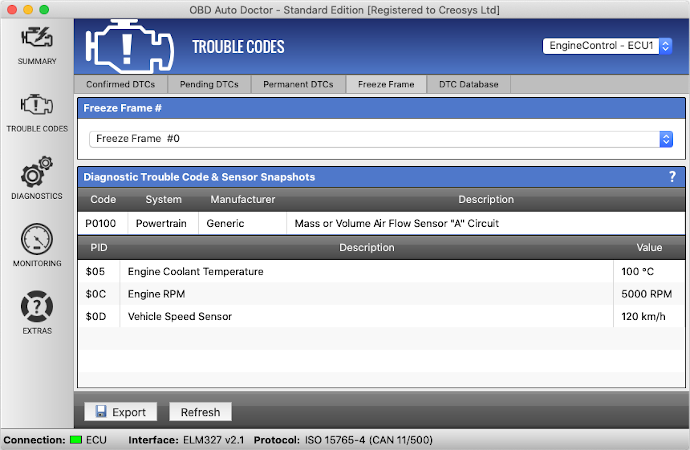
A typical freeze frame display showing engine RPM, coolant temperature, and other recorded parameters.
The Difference Between Freeze Frame and Live Data
Many people confuse these two features, but they serve different purposes:
| Feature | Freeze Frame Data | Live Data |
|---|---|---|
| Timing | Snapshot at the moment of fault | Real-time, continuously updating |
| Storage | Saved in ECU memory | Not stored |
| Purpose | Shows conditions that caused a problem | Shows current sensor performance |
| Diagnostic value | Best for troubleshooting a specific code | Best for observing trends and testing repairs |
| User skill level | Suitable for beginners | Requires more knowledge to interpret |
Use freeze frame data to answer "what caused this?" Use live data to answer "is the system working correctly now?"
Common Mistakes When Reading Freeze Frame Data
Even experienced technicians make errors with freeze frame data. Here are the most frequent mistakes:
1. Clearing Codes Before Saving Data
Once you clear a fault code, the freeze frame data disappears too. Always record the data before pressing "Erase" — either write it down, screenshot it, or save it in the scanner.
2. Ignoring Freeze Frame Data from Multiple Codes
If your car has several stored codes, check whether each code has its own freeze frame. Comparing them can reveal whether all faults occurred simultaneously or at different times — an important clue for diagnosis. A good way to approach this is to explore the articles on the Motor Rankings blog for general diagnostic strategies.
3. Misinterpreting Units
Some vehicles report temperature in Celsius, others in Fahrenheit. Similarly, vacuum readings might be displayed in kPa, PSI, or mmHg. Always verify which units your scanner is using.
4. Trusting Faulty Sensor Data
If a sensor fails completely, it may report a value "frozen" at a default or impossible reading. For example, a coolant temperature of -40°F on a warm engine means a wiring problem or sensor failure — not that the engine is truly that cold.
5. Assuming Freeze Frame Data Is Always Current
Freeze frame data represents the first time the fault occurred, not necessarily the most recent. If a code appeared weeks ago and keeps coming back, the stored data may not reflect your current driving conditions.
Using Freeze Frame Data for Specific Trouble Codes
Different trouble codes require different interpretation strategies. Here are two examples:
Example 1: P0171 — System Too Lean (Bank 1)
Typical freeze frame values for this code:
- Fuel trim: +15% or higher
- MAF reading: Low for current RPM
- O2 sensor voltage: Low (around 0.2V)
Interpretation: A high positive fuel trim combined with low MAF readings points to unmetered air entering the engine — a vacuum leak. Check intake hoses, the PCV system, and the intake manifold gaskets first.
Example 2: P0128 — Coolant Thermostat Stuck Open
Typical freeze frame values:
- Coolant temperature: Below 160°F (71°C) at highway speeds
- Engine RPM: 2,000-3,000
- Vehicle speed: Above 40 mph
Interpretation: If the engine can't reach operating temperature on a warm day while driving at speed, the thermostat is likely stuck open. On modern vehicles with electrically controlled thermostats, check for wiring issues first.
Using freeze frame data for a P0171 lean condition code to guide troubleshooting.
Understanding Vehicle Manufacturer Differences
Freeze frame data isn't standardized the same way across all manufacturers. Here's how different brands handle it:
- Toyota and Lexus: Record extensive freeze frame data, including marginal parameters like fuel pressure and EGR valve position.
- Ford: Typically records standard parameters only — RPM, speed, coolant temperature, and fuel trim.
- Honda and Acura: Some models store multiple freeze frames for repeated codes, so you can compare different occurrences.
- European vehicles (BMW, Mercedes, VW, Audi): Often capture enhanced data such as turbo boost pressure, battery voltage, and specific module-level parameters.
This means you might get more diagnostic information from a Toyota than a Ford when using the same scanner. For deeper manufacturer-specific data on European and Asian vehicles, you may need a scanner with enhanced diagnostics or access to a dealer-level tool.
Choosing the Right OBD2 Scanner for Freeze Frame Data
Not every scanner handles freeze frame data equally well. Here's what to look for:
Essential Features
- Freeze frame capability: Sounds obvious, but many budget code readers skip this. Check the spec sheet before buying.
- Clear display: A screen that's readable in daylight and shows multiple parameters at once.
- Data exporting: The ability to save freeze frame data to your phone or export it as a file is valuable.
- Live data alongside freeze frame: Some scanners let you compare the frozen values with current readings — a useful diagnostic technique.
- Vehicle coverage: Make sure the scanner supports the make and model of all vehicles you'll work on.
Recommended Scanner Categories
| Category | Price Range | Best For |
|---|---|---|
| Entry-level | $30-60 | Students, first-time users |
| Mid-range with app | $100-200 | DIY enthusiasts (BlueDriver, FIXD) |
| Professional-grade | $300+ | Mechanics and serious DIYers (Autel, Launch, Snap-On) |
| Bidirectional | $500+ | Advanced diagnostics and actuator testing |
For a deeper look at where to get started with scanning, browse through our collection of diagnostic guides to pick up additional tips.
Advanced Techniques for Experienced Users
Once you're comfortable with the basics, you can use freeze frame data to tackle more challenging diagnostics.
Analyzing Intermittent Faults
Intermittent problems are the hardest to diagnose. Freeze frame data helps you identify patterns:
- If the freeze frame always shows the same RPM and load conditions, the problem is likely related to that specific operating point.
- If the data differs each time, the fault may be caused by heat, vibration, or an electrical connection issue.
Comparing Multiple Components
Some vehicles record freeze frame data from multiple modules (engine, transmission, ABS). Cross-referencing this data can reveal interactions between systems. For instance, a transmission slip code combined with engine misfire data might point to a drivetrain issue rather than a standalone transmission problem.
Using Freeze Frame Data for Warranty Claims
When a component fails intermittently and you need dealer support, freeze frame data provides documentary evidence. It records when and under what conditions the fault occurred, which can strengthen your case, especially for recalls or warranty repairs.

A large scan tool displaying freeze frame data, useful for your own troubleshooting or documenting issues.
What to Do When Freeze Frame Data Doesn't Match Symptoms
If you've used freeze frame data to guide repairs but the symptom returns, consider these possibilities:
- The stored event may be old, not reflecting current conditions.
- Multiple faults may be present, and you've only fixed one.
- The problem might be temperature-dependent or intermittent.
Limitations of Freeze Frame Data
Freeze frame data is powerful, but it has limitations that you need to respect:
- One snapshot per code: Most ECUs store only one freeze frame per trouble code. A newer fault overwrites the old data.
- Not a complete history: It doesn't show what happened before or after the fault, only at the exact moment of detection.
- Sensor-dependent: The data is only as reliable as the sensors feeding it. A faulty sensor will record inaccurate data.
- Subject to regulation: For emissions-related codes, freeze frame requirements are standardized. For other codes, manufacturers have discretion.
- No predictive power: Freeze frame data tells you what happened, not what will happen next.
Frequently Asked Questions
What does freeze frame data mean on an OBD2 scanner?
Freeze frame data is a recorded snapshot of your vehicle's engine parameters taken at the exact moment the ECU detects a fault and triggers a trouble code. It shows conditions like RPM, speed, coolant temperature, and fuel trim at that instant, helping you understand what caused the problem.
How do I view freeze frame data?
Connect an OBD2 scanner that supports this feature, navigate to the trouble code screen, select the specific code, and choose the freeze frame or FFD option. Check your scanner's manual since menu locations vary by brand.
Will clearing the trouble code erase freeze frame data?
Yes. Clearing diagnostic trouble codes also deletes the associated freeze frame data. Always save or record the freeze frame information before clearing codes.
Is freeze frame data the same as live data?
No. Live data shows real-time sensor readings that update continuously. Freeze frame data is a static snapshot from when the fault occurred. They serve different purposes — freeze frame for diagnosis, live data for testing and verification.
Can I fix my car using only freeze frame data?
Freeze frame data is a powerful starting point, but it's not always sufficient. Some problems require additional tests, wiring checks, or listening for unusual sounds. Use freeze frame data to prioritize what to inspect first, not to skip other diagnostic steps.
Why does my scanner not show freeze frame data?
Not all OBD2 scanners support freeze frame data. Basic code readers often only display trouble codes. You'll need a more capable mid-range or professional diagnostic tool to access this feature.
Conclusion
Freeze frame data transforms the check engine light from a frustrating mystery into an actionable diagnostic snapshot. Instead of guessing which part to replace, you can see exactly what your engine was doing when the problem occurred. This single feature can save you hours of trial-and-error repairs and prevent unnecessary part replacements.
The key takeaways to remember:
- Always record freeze frame data before clearing codes — once you erase trouble codes, the snapshot is gone.
- Interpret values in context — a high fuel trim tells a different story on a cold engine than on a warm one.
- Use it to narrow your inspection — data pointing to a vacuum leak or failing sensor saves you from blindly replacing parts.
- Respect the limitations — freeze frame data is one diagnostic tool, not a complete solution.
Your next step: the next time your check engine light illuminates, don't just read the code. Put your scanner to work and check the freeze frame data before you start ordering parts. For more diagnostic strategies and guides, browse the articles on the Motor Rankings blog.

Leave a Reply