
Few things are more annoying than sliding into your car, cranking the stereo, and hearing nothing. The screen lights up, the buttons respond, and the clock is still on — but the speakers stay silent. If that sounds familiar, you’re in the right place.
The good news is that a silent car stereo is usually fixable, and a surprising number of cases come down to a simple setting or a loose connection. This guide walks you through the entire troubleshooting process, from the two-second checks to the deeper electrical work, so you can pinpoint the cause and get your music back.
Why Your Car Stereo Produces No Sound
Before you start pulling panels apart, it helps to understand what’s happening under the dash. A car audio system is a chain: the head unit (your stereo) sends an audio signal through wiring to the speakers, and in many setups, through an amplifier first. If any link in that chain fails, the result is silence.
Common culprits include:
- Blown fuses
- Loose or corroded wiring
- Faulty speakers
- Amplifier issues
- Muted or misconfigured audio settings
- A frozen or glitched head unit
The key is to work through these systematically, starting with the cheapest and easiest fixes.
Quick Checks That Solve the Problem in Minutes
Surprisingly often, the answer is hiding in plain sight. Before you unscrew anything, run through these:
- Volume level — It’s easy to knock the volume knob down to zero when grabbing your bag or phone.
- Mute button — Check the stereo display for a mute icon, and press the mute button twice to be sure.
- Source selection — If you’re on AUX or Bluetooth with nothing connected, you’ll get silence. Switch to radio or USB to test.
- Try another input — If one source works but another doesn’t, the problem is with the input, not the whole system.
- Phone volume — If you’re playing via Bluetooth, the phone’s volume might be at zero even though the stereo volume is up.
In practice, these basics solve roughly one in five “no sound” cases. It’s worth the 30 seconds.
Checking the Fuses and Power Supply
If the quick checks don’t help, the next suspect is power delivery. Your car’s audio system relies on one or more fuses to protect against electrical surges. A blown fuse can cut power to the entire stereo or just the speaker output.
How to Locate and Inspect the Fuse
- Find the fuse box — usually under the dashboard on the driver’s side or in the engine bay.
- Check the fuse box diagram (printed on the cover or in the owner’s manual) to identify the stereo fuse.
- Pull the fuse with a fuse puller or needle-nose pliers and look at the metal strip inside. A broken or melted strip means it’s blown.
Replacing a Blown Fuse the Right Way
Always replace a blown fuse with one of the exact same rating, measured in amps (e.g., 10A, 15A). Installing a higher-rated fuse can cause wire damage or even a fire.
If a new fuse blows immediately, don’t keep swapping them — there’s a deeper electrical problem, likely a short circuit, that needs professional diagnosis.
Inspecting the Wiring and Connections
Loose or damaged wiring is one of the most common causes of a silent stereo. Over years of driving, vibrations and rough roads can loosen connections, and previous repairs may have left wires pinched or exposed.
How to Check Wiring Safely
- Turn the car completely off before touching any wiring.
- Remove the stereo head unit using removal keys or a set of thin trim tools.
- Inspect the main power (yellow), ignition (red), and ground (black) wires for tight, corrosion-free connections.
- Follow the speaker wires to each speaker and check for loose or damaged connections.
A common mistake is assuming a single bad speaker wire only affects that one speaker. In systems wired in series, one loose connection can mute the entire output.
Before you start testing wires, it’s worth checking the wiring standards for your specific vehicle. Authoritative resources like Crutchfield provide detailed installation guides and compatibility charts that make the job much easier.
Typical Car Stereo Wire Colors
| Wire Color | Function |
|---|---|
| Yellow | 12V constant (battery) |
| Red | 12V ignition (switched) |
| Black | Ground |
| Blue | Antenna / amplifier remote |
| White / Gray / Green / Purple | Speaker pairs (+/-) |
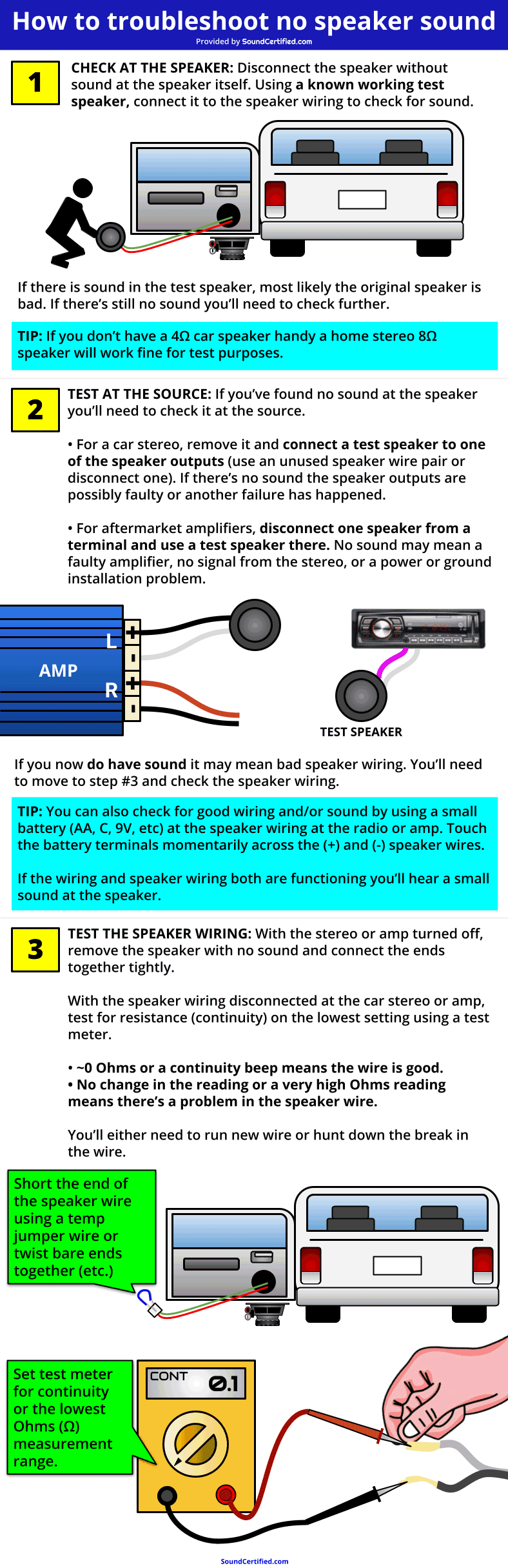
Credit: soundcertified.com
If you spot a disconnected or frayed wire, reconnect it or replace the damaged section before moving on.
Testing the Speakers One by One
If the wiring checks out, the speakers themselves could be at fault. Here’s how to isolate a bad speaker.
Balance and Fader Test
Use the stereo’s balance and fader controls to push sound to each corner of the car. If you get sound from some speakers but not others, the silent ones are either dead or have a broken wire.
The Battery Test
Remove a silent speaker and briefly touch its terminals to a 1.5V AA battery. A working speaker will produce a small pop or click. If you hear nothing, the speaker’s voice coil is likely burnt out.
Comparing Speaker Symptoms
| Symptom | Likely Cause |
|---|---|
| No sound from all speakers | Head unit, amp, or main wiring issue |
| No sound from one speaker | Bad speaker or broken wire to that speaker |
| Distorted or crackling sound | Blown speaker or poor connection |
One overlooked cause: exposed speaker wires can short against metal parts inside the door or dashboard, killing all sound. Always check for worn insulation.
Checking the Amplifier (If Your System Has One)
Factory premium systems and aftermarket setups often include an external amplifier. If the amp loses power or its remote turn-on signal, you’ll get silence even though the head unit looks fine.
How to Test the Amplifier
- Look for a power LED on the amp — if it’s off, the amp isn’t receiving power.
- Check the remote turn-on wire (usually blue) — it tells the amp to switch on when the stereo powers up.
- Inspect the amp’s inline fuse and replace it if blown.
- Bypass the amp by connecting a speaker directly to the head unit’s output. If sound returns, the amp is the problem.

Credit: www.lifewire.com
If the amp is getting power and the bypass works, the amp itself is faulty and likely needs repair or replacement.
Resetting the Head Unit
Sometimes the stereo’s internal processor simply freezes. A reset often clears the glitch and restores sound.
- Power cycle — Turn the car off, wait a minute, and turn it back on.
- Factory reset — Many head units have a small reset button behind a pinhole. Press it with a pen tip.
- Battery disconnect — Remove the negative battery terminal for five minutes, then reconnect.
Keep in mind that a factory reset wipes your saved stations, clock, and personal audio settings — a small price for getting sound back.
Reviewing Audio and Phone Settings
Misconfigured settings are more common than people think. Even experienced drivers miss these:
- Balance and fader — If the sound is set fully to one corner, the rest of the car stays silent.
- Equalizer — Extreme EQ settings can effectively mute certain frequencies or reduce overall output.
- Phone mute — Some vehicles automatically mute the stereo during calls. If the system gets stuck in this mode, you’ll hear nothing until it’s cleared.
- Bluetooth volume — Pair your phone again and check both the phone’s volume and the stereo’s Bluetooth volume separately.
While you’re in the settings menu, it’s also worth adjusting other stereo preferences to make sure nothing else got changed accidentally.
Software and Firmware Updates
Modern head units rely on software, and bugs can cause audio output to fail. Check your stereo manufacturer’s website for firmware updates.
- Download the update file to a USB drive.
- Insert the drive into the stereo’s USB port.
- Follow the on-screen instructions to install.
If you’re uncertain about the process, a dealership or professional car audio installer can handle it safely.
When to Call a Professional
If you’ve worked through every step above and the stereo is still silent, it’s time to bring in an expert. Issues like a damaged circuit board, cold solder joints, or complex wiring faults require specialized tools and experience.
Cost Comparison
| Fix Type | DIY Cost | Professional Cost |
|---|---|---|
| Fuse replacement | $2 – $5 | $20 – $50 |
| Speaker replacement | $20 – $100 per speaker | $50 – $200 per speaker |
| Head unit repair/replace | $50 – $400 | $100 – $800 |
| Amplifier repair | $50 – $200 | $100 – $500 |
Before spending anything, check your car’s warranty — stereo repairs are sometimes covered, especially on newer vehicles.
Preventing Future Sound Problems
A few smart habits will keep your stereo playing for years:
- Install carefully — Use the right tools and never pinch wires during installation.
- Check connections after rough rides — Off-roading or hitting potholes can loosen wires over time.
- Don’t overload the system — Adding too many speakers or an oversized amp stresses the electrical system.
- Update firmware when available — Software fixes often resolve intermittent audio bugs.
- Keep the cabin clean — Dust and debris can find their way into the dash controls. A regular interior clean helps keep the environment around your stereo healthy.
Frequently Asked Questions
Why does my car stereo turn on but there’s no sound?
This typically means the head unit is receiving power but the audio signal isn’t reaching the speakers. Check volume, mute, source selection, fuses, wiring, and the amplifier in that order.
Can a blown fuse cause the radio to have no sound?
Yes. A blown fuse can cut power to the entire stereo or just the audio output. Replace it with the same amperage, and investigate if it blows again immediately.
What if only one speaker has no sound?
A single silent speaker is usually a bad speaker or a broken wire to that speaker. Swap it with a known good speaker or check the wiring to confirm.
Why is there no sound on Bluetooth or AUX?
Common causes include a faulty cable, a muted device, or incorrect input settings. Try a different cable and device, and check volume levels on both the phone and stereo.
How do I know if my amplifier is the problem?
If all speakers are silent and your system has an amp, check its power LED, remote turn-on wire, and inline fuse. Bypassing the amp (connecting a speaker directly to the head unit) will confirm whether the amp is faulty.
Conclusion
A silent car stereo is frustrating, but it’s rarely a mystery once you work through the steps in order. Start with the easy checks — volume, mute, and source selection — then move through fuses, wiring, speakers, and the amplifier. In most cases, you’ll find the culprit and get your music back without a trip to the shop.
If you’ve tried everything and the problem persists, don’t hesitate to call a professional. And when you’re ready for more practical advice on keeping your car in top shape, our car care guides are a great place to start.

Leave a Reply