
If you’re searching for the best touch screen car stereo for 2024 and you happen to be reading this later, do not let the headline fool you. Aftermarket car audio moves slowly. A good head unit stays relevant for years, and the buying mistakes people made in 2024 are the same mistakes they still make today.
The real answer to that question has nothing to do with the biggest screen or the most expensive brand. It starts with your car’s dashboard, your phone, and how you actually drive. For more on this, see our guide on how to fix car stereo touch screen.
The Short Answer
The best touch screen car stereo for most drivers is a double-DIN unit with a capacitive screen, wired or wireless Apple CarPlay and Android Auto, at least one camera input, and a face that physically fits the dashboard.
Beyond that, the best choice is the one that matches your budget and your listening habits. You do not need a 1000-watt brand-name stereo if you mostly listen to podcasts. But you also should not buy the cheapest screen-only model if you depend on Google Maps every day.
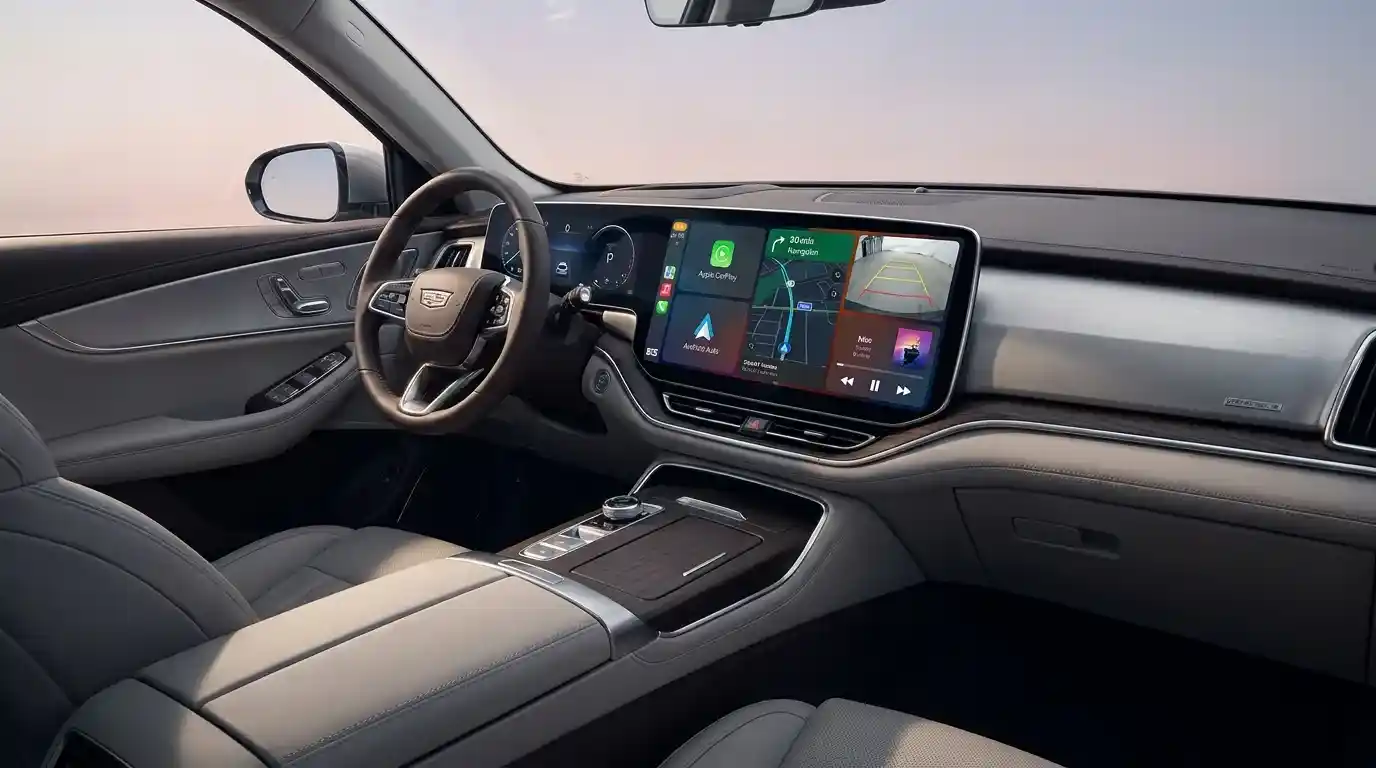
The dashboard opening determines which stereo sizes fit far more than brand preference.
Why a Touch Screen Stereo Is Worth the Upgrade
Stock stereos are often functional but boring. A touch screen upgrade changes the everyday driving experience in four big ways:
- Easier controls. Large tap targets are easier to hit than tiny radio buttons, especially when you are familiar with the layout.
- Better phone integration. Modern units mirror your phone’s apps, maps, and calls on the dashboard screen.
- A sharper image. Back-up cameras and screen quality improve dramatically compared with old factory displays.
- More sound control. Most aftermarket stereos include audio settings that make factory speakers sound cleaner, even before you upgrade them.
The catch is that some screens are slow, some are nearly invisible in sunlight, and some simply do not fit your car. That is why fitment and display quality matter more than audio brand name.
Before You Buy: Start With Fitment
Single DIN vs. Double DIN
Car stereos usually come in two chassis sizes:
- Single DIN: About 2 inches tall. This is the older standard and is still common in many trucks, vans, and compact cars.
- Double DIN: About 4 inches tall. Most touch screen models and almost all large-screen models use this size.
Before you think about CarPlay, measure your dashboard’s radio opening. Some cars need extra plastic trim pieces or a mounting kit. If you are unsure, a proper owner manual or a quick online search for a mounting kit will confirm the replacement.
A larger screen can be seated incorrectly, and an oversize face can block, air vents, or the gear shifter. That is exactly why fitment is the first decision.
Floating Screens Are the Workaround
If your car only has a single DIN opening, a “floating” display gives you exactly what you want. The head unit chassis may be small, but the screen sits slightly in front of the dash at lap area. This lets you have a large display without needing a large opening.
It looks impressive, but floating screens require you to be careful about how far the display sticks out from the dashboard. If the screen blocks the temperature controls or your knee hits it while driving, no amount of sound quality will make up for it.
Key Features That Actually Matter
Screen Quality: Capacitive Always
When a touch screen car stereo is called "cheap," it is often because it uses old resistive touch technology. Resistive screens require pressure and often respond with a lag. Capacitive screens, like the one your smartphone uses, are faster and much more accurate.
Always take a quick look at a product specs for “capacitive.” If it does not say that, treat the touch quality as a potential downside.
Apple CarPlay and Android Auto
These two systems are no longer a premium extra. Wired Apple Auto and Android Auto are standard and basically expected in any modern aftermarket stereo.
The all-important decision is wireless versus wired:
- Wireless CarPlay/Android Auto sync so you can use your phone while it is still in your pocket. It is cleaner and more convenient.
- Wireless systems can sometimes lag a half-second when starting and drain the phone battery faster.
- Wired systems are bulletproof and generally have a faster startup.
If you only do short trips around town, a wired unit is enough. The excitement was charging at the same time. If the cable bothers you, invest in wireless.
Camera Inputs
A touch screen double is one of the easiest ways to install a backup camera. Most units have at least one camera input, and many have two or three. If a backup camera is a priority, make sure the selected unit supports camera input instead of assuming.
Audio Tuning
Do not buy a stereo based on watts per channel. Factory speaker upgrades rarely need that much power. What matters more are:
- A 3-4 band equalizer for basic tuning.
- A 13-band equalizer or digital signal processor (DSP) if you want more control.
- 3 preamp outputs if you plan to add external amplifiers or a subwoofer later.
If you do not plan to add an amplifier, a lucky interface audio works better than you expect.
Setup and Hardware
Every stereo will need a wiring harness adapter for your specific car. Some cars also need a special adapter to retain steering wheel controls, backup cameras, or factory USB ports, and those adapter kits add installation cost.
Sit down with your installation budget before shopping, not after.
Top Touch Screen Car Stereos to Consider
These models are still widely available and are the units you will find recommended by car audio shop after car audio shop. Compare them based on your vehicle, your screen needs, and your audio plans.
1. Pioneer AVH-W4500NEX
A favorite all-rounder for drivers who want wireless phone integration in a traditional double DIN package.
- 6.94-inch clear touch screen
- Wireless Apple CarPlay and Android Auto
- 13-band equalizer
- Two camera inputs
- High-res audio support
The screen brightness is strong, and most owners never complain about connectivity. If you want a simple, feature-rich unit with exceptional value, this is a good starting point.
2. Sony XAV-8000
This “floating” design is for mixed audiovisual displays. The screen can be adjusted to fit almost any angle.
- 8.95-inch anti-glare LCD
- Wired Apple CarPlay and Android Auto
- 55 W x 4 auxiliary amplifier
- Around double single DIN chassis
It works especially well in cars where a standard dash mount does not have space. The anti-glare overlay does a much better job in sunny weather than most other screens in the price range.
3. Kenwood Excelon DDX9907XR
A favorite for people who spend time on sound tuning and want a clear, bright display at every brightness.
- 6.8-inch high-definition display
- Wireless and wired CarPlay/Android Auto
- 13-band equalizer
- Three camera inputs
- High voltage audio connections
It’s not the cheapest unit, but the combination of sonic control and reliable app integration gives excellent long-term satisfaction.
4. Alpine iLX-350W
This small footprint is a known favorite for drivers who want a budget-friendly unit with a reliable interface.
- 7-inch capacitive screen
- Wired Apple CarPlay/Android Auto
- Shallow chassis makes wiring easier
- Crystal-clear interface without excessive clutter
Alpine attempts for devices and direct operation. It is also one of the least tedious stereos to install in a compact car.
5. Boss BVCP9700A
A sensible entry-level choice for drivers who need basic smartphone connectivity.
- 7-inch touchscreen
- Wired Apple CarPlay/Android Auto
- 80 W x 4 max output
- Compatible with a backup camera
Sound quality is completely satisfactory, but the interface animation is not as slick as more premium units. What makes it popular is the price.
6. JVC KW-M865BW
The JVC is the smooth midrange candidate where wireless connectivity and audio quality meet at an accessible value.
- 6.8-inch clear screen
- Wireless Apple CarPlay/Android Auto
- High-res audio support
- Two camera inputs
It doesn’t chase unnecessary extras. It simply does the important things well and remains easy to use.
7. Atoto A6 PF
One of the few truly Android-focused head units can carry more entertainment apps than standard Apple CarPlay recommends.
- 7-inch IPS display
- Wireless and wired Android Auto, plus wireless CarPlay
- App support built into the unit itself
- Fast boot time
If you like having YouTube, Spotify, and navigation on the screen without pulling out your phone, Atoto is worth a serious look.
8. Pioneer DMH-WT8600NEX
For a bold, Tesla-like dashboard look, this large-screen model takes the center stage.
- 10.1-inch high-definition floating display
- Wireless Apple CarPlay and Android Auto
- 13-band equalizer
- Modular design to improve fit
- High-res audio support
It is big, it is sharp, and it is not ideal for every car. However, if the installation is feasible in your cockpit, it feels more like a tablet than a traditional radio.
How Top Models Compare Side by Side
| Model | Screen Size | CarPlay / Android Auto | Wireless Phone Connection | Camera Inputs |
|---|---|---|---|---|
| Pioneer AVH-W4500NEX | 6.94" | Yes / Yes | Yes | 2 |
| Sony XAV-8000 | 8.95" | Yes / Yes | No | 1 |
| Kenwood Excelon DDX9907XR | 6.8" | Yes / Yes | Yes | 3 |
| Alpine iLX-W650 | 7" | Yes / Yes | No | 1 |
| JVC KW-M865B | 6.8" | Yes / Yes | Yes | 2 |
| Atoto A6 | 7" | Yes / Yes | Yes | 1 |
The chart shows a clear pattern: wireless car connection and high-quality screens add extra cost. Do not pay for that unless you know you will use it. A backup camera input is valuable because almost any car can benefit from a clear view behind you.
Sound Quality Beyond the Spec Sheet

The screen on a floating head can be tilted to point more directly at the driver.
The number on the speaker amplifier doesn’t tell you much. Instead, look at how much control the unit gives you over sound. For most listeners, a good equalizer and simple crossovers are enough to make the audio feel balanced.
- A poor-quality source will only amplify poor sound. Play cleaned and well-recorded tracks to judge a system.
- Factory speakers are fine for a while. Even a gutless stereo may sound better with the equalizer set flat.
- If you plan a subwoofer later, choose a unit with a proper subwoofer output rather than trying to tap into the speaker output.
Do not let a salesperson convince you to buy an expensive equalizer if you do not plan to speak the system. A simple new stereo usually sounds much better than a factory loaner.
Wireless: Is It Really Worth It?
Wireless Apple Auto and Android Auto remain polarizing. Here is a fair balance:
- Wireless convenience: No cables in the phone, no going through a broken lightning/USB connector every drive.
- Wireless cost: Usually $100 more or more than the wired version.
- Battery usage: A wireless dashboard connection can drain the phone faster when navigation is active.
- Wired safety: A physical connection almost never loses signal or waits to sync when you start the car.
So if you have a long daily that uses navigation and does not plug it in when you get in, wireless is delightful. If you simply plug in for a short trip and use the interface, wired is enough.
The Importance of Memory and Interface
A neat screen is only good if it does not steal attention away from the road. The best models have simple, custom interface layouts:
- Large icons that are not cluttered
- Quick access to media, maps, and phone
- Left-mounted or bottom-mounted shortcuts in the driver's reach
- PSI (and easy access to the last screen you used) when you return to the car
One often overlooked quality is the ability to adjust the text size. If you have trouble reading eye-level navigation while driving, this can be more important than any other feature. Similarly, if the unit can set the display language to match your preference, change it shortly after installation rather than fumbling in the menus later.
Install: Do It Yourself or with a Pro
Including a new touchscreen stereo is one of the few car upgrades the average owner can complete: unplugging oldd, installing a dash kit, and connecting a harness.
DIY If You Have the Basics
If you own a trim tool kit and know how to unclip a fascia, replace the head unit yourself can save between the suggested labor cost. The steps are usually the same:
- Charge the car battery.
- Remove the plastic trim around the factory stereo.
- Unclip the stock unit and unplug the wiring.
- Connect the wiring harness adapter, which is vehicle-specific.
- Plug in the new unit and test before fitting the trim all the way.
Get Help with Advanced Vehicles
If your car has factory navigation, amp, or have an integrated screen, the install becomes more complex. Start work on it if you are not comfortable reading wiring diagrams, then use a professional.
The same goes for installing a backup camera that has to be fed from the license plate to the dash. That is not difficult, but it takes time and some patience.
Why You Should Measure Another Critical Part — Car Seats
The best time to think about the complete cabin situation is when the dash is partially removed. Many car owners discover they also have the built-up food and pet hair that becomes more visible when the seats are moved for access. This is a good the moment to use effective interior-cabin. If your carpet and floor access is still clean, clean under the seats before snapping the trim back in place.
A small, cordless vacuum will handle this easily if you know [how to choose a car vacuum cleaner](https://motorrankings.com/how-to-choose-a donate and-vacuum-cleaner/) that fits your needs. You do not need to win over a massive shop system. You only need enough reach to clean the carpet into the dash and under the front and rear seats.
Many people also take the opportunity to replace worn seat covers. If you are using covers after a pixel screen install, keep safety in mind. The cabin must have airbag-safe seat covers if the vehicle has side airbags. A seat cover that blocks the inflation path could turn a small fame into a bigger one.
A Model for the Complete Consideration Process
| Question | What to Look For | Your Answer |
|---|---|---|
| What is the dash opening? | Single or double DIN | size |
| What is the touch glass? | Capacitive is preferable | yes/no |
| Does the phone on? | Wired or wireless CarPlay/Android | protocol and cable |
| Will I use a backup camera? | 1 or more camera inputs | cost adm |
| Do I need to tune sound? | 13-band EQ or DSP | yes/no |
| Do I need future? | 3 preouts, subwoofers | yes/no |
Write your answers down before wanting to buy. That simple item will stop you from impulse-buying a large screen that does not fit your car.
How to Build a Safer Digital Cockpit
The stereo’s biggest job every day is not entertainment; it is avoiding the need to look away from the road. This is why the distributed menu is so important.
Use the voice button if the unit has one. Most stereo support Siri or Google Assistant, which lets you say, “Navigate home,” or “Call Sarah,” without tapping the screen. You can still follow the NHTSA's distracted-driving guidance by keeping interaction with the display easy, brief, and familiar.
Another smart habit is to set the home screen with only two or three primary pieces: navigation, music, and phone. Put your favorite map app first. When the car starts, you should not be scrolling through pages of icons.
Frequently Asked Questions
What touch screen size is best?
For most vehicles, 6.2 to 7 inches feels natural. It does not cover too much, but it is still crisp and easy to read. 8–10-inch screens you can want if you use them primarily for GPS. But large icons are frustrating when a screen blocks your view. Measure the space before assuming bigger is better.
Do I need Apple CarPlay or Android Auto?
If you use Google Maps, Spotify, Waze, or WhatsApp while driving, yes. This integration is what makes a car stereo useful in 2026. If you just want Bluetooth music, you can save money on a simpler device-and-play stereo.
Is wireless CarPlay/Android Auto reliable?
The trade is usually reliable but not perfect. Connection errors happen occasionally, especially when you walk out of range of the car. Wired is nearly always more stable, but wireless feels cleaner and less annoying. Every driver has one or the other.
Can I install a touchscreen stereo in my car if it has steering wheel controls?
Usually, yes. Many newer units support an advanced harness that integrates the existing steering wheel switch into the new stereo. You may need a separate adapter module, so include the extra $50-$100 of the installation cost.
Will a touchscreen sound better than my factory radio?
Almost always. A decent aftermarket stereo has more power, cleaner audio processing, and more equalizer adjustment than the OEM basic unit. The factory speakers are the future gap. If the speakers are not too cheap, the difference is immediately noticeable.
Is a touch screen stereo worth it for an older car?
Absolutely. Even a decade-old car gains modern safety features like a backup camera display, voice control, and reliable smartphone navigation. The improvement in daily usability is much larger than you might expect. The main constraint is never the car's age — it is the size of the dashboard opening and whether you are comfortable with a wiring harness.
Conclusion
Choosing the best touch screen car stereo for 2024 really comes down to three decisions: the size of your dashboard opening, whether you prefer wired or wireless phone integration, and how much audio control you actually want. The brand name matters far less than those three factors.
A solid touch screen upgrade will transform a dated interior into a modern connected cockpit for a few hundred dollars plus installation. It adds a backup camera view, puts your phone's maps and music safely on a large display, and usually improves sound quality enough that you notice it on the very first drive.
Start with a tape measure and a quick look at your car's stereo opening. Then decide on wired versus wireless connection. Finally, pick a unit from a reputable brand that supports your phone's ecosystem. That process will get you a stereo you are still happy with years from now — no matter what year you read this.

Leave a Reply