
A car stereo is only as good as its setup. You can spend thousands on speakers, yet a badly tuned equalizer will still make music sound thin, muddy, or harsh. The good news? You don't need an expensive amp or a professional installer to make a dramatic improvement. With a basic understanding of frequencies and a few disciplined listening steps, you can dial in a balanced, detailed sound that suits your car, your music, and your ears.
This guide explains exactly how to find the best equalizer setting for your car stereo, with frequency charts, starting curves, troubleshooting fixes, and modern features worth using. You can also read our guide on how to adjust car stereo for best sound.
What an Equalizer Does—and Why It Matters in a Car
An equalizer lets you control the loudness of specific frequency ranges. Instead of a single bass or treble knob that changes an entire region at once, a multi-band EQ can adjust a narrow slice of the audio spectrum. That precision matters because every car interior colors sound differently.
Glass reflects high frequencies. Soft seats absorb mids. Doors and trunks resonate with bass. A flat EQ in a car rarely sounds flat—it usually sounds bright, boomy, or hollow depending on where you sit. That is exactly why a thoughtful EQ curve is the single highest-value sound upgrade most drivers can make. For more on this, see our guide on how to fix car stereo touch screen.

A typical in-dash equalizer interface before any adjustments are made.
Image source: eliteautogear.com
The Frequency Ranges You're Actually Adjusting
Understanding what each frequency range does turns random knob-twisting into a deliberate tuning session.
| Frequency Range | What You Hear | Common Problems |
|---|---|---|
| 20–60 Hz (sub-bass) | Deep rumble and low organ notes; you feel this more than hear it | Too much causes drone and door rattle |
| 60–120 Hz (bass) | Kick drum weight and bass guitar body | Too little sounds thin; too much sounds boomy |
| 120–250 Hz (low midrange) | Lower vocals and warmth | Excess makes music muddy and unclear |
| 250–500 Hz (low mids) | Body of guitars, snare drum fullness, vowel sounds | Heavy buildup causes a "boxy" or nasal tone |
| 500 Hz–2 kHz (midrange) | Most instruments and the main energy of music | Too much sounds honky; too little sounds hollow |
| 2–4 kHz (upper mids) | Vocal clarity, attack, and presence | Excess causes ear fatigue and harshness |
| 4–8 kHz (presence) | Cymbals, sibilance, detail, "air" | Too much produces hiss and sharp "S" sounds |
| 8–20 kHz (treble/air) | Sparkle, high harmonics, brightness | Very little musical content; excess adds glare |
Most factory stereos only have five bands, and many modern units use seven or more. You do not need to memorize every number. Focus on the broad areas: bass, lower mids, upper mids, and treble.
Before You Tune: Reset Everything to Flat
The fastest way to ruin a tuning session is to start from a boosted preset you liked three years ago. Your ear has already adapted to it, and you will not be able to hear what needs to change. For more on this, see our guide on how to connect phone to car stereo.
Start from a truly flat EQ:
- Set every EQ band to 0 dB.
- Turn off loudness, bass boost, and any "enhance" effects.
- Set balance and fader to the center, or slightly toward the driver's seat—but centered if you want the whole cabin to sound good.
- Disable any automatic volume or speed-sensitive volume control.
- If your head unit has different EQ memories for different sources, reset each of them.
Flat is your neutral starting point. It reveals what your car's cabin and speakers are actually doing to the music. If you are not sure where the language or reset menu is, a quick look at the head unit's menu language guide is a good first step.
Step-by-Step: Best Equalizer Setting for Car Stereo
There is no one universal "best equalizer setting," but there is a reliable process that gets you close, no matter what car you drive.
Step 1: Choose Reference Songs You Know Cold
Use music you have heard on good headphones, a good home stereo, or live. Familiarity is more important than genre. Pick three songs:
- One with acoustic vocals and guitar, to hear mids clearly.
- One with synthesized bass or hip-hop, to check low-end accuracy.
- One with bright cymbals and live drums, to judge treble harshness.
Play these same three songs throughout the tuning process. The point is not to find an EQ that suits one song; it is to find a curve that makes all three sound natural.
Step 2: Set Volume to a Realistic Listening Level
Tune at the volume you actually listen to. If you set the EQ while the stereo is nearly silent, you will almost certainly overshoot the bass and treble.
Avoid extremely loud session levels as well. Loud volume causes ear fatigue and makes you perceive less bass and treble, which leads to over-boosting. Keep the volume high enough to hear details clearly, but not so high that you wince at sudden transients. It is worth checking CDC hearing health resources for guidance on protecting your hearing.
Step 3: Shape the Bass
Start with the lowest frequency bands. For a five-band EQ, these are usually around 60 Hz and 230 Hz.
- Add +2 to +3 dB at the lowest band for music with strong bass.
- Keep the low-mid band near 0 dB, or cut it by 1 to 2 dB if the music sounds muddy.
- If bass sounds lumpy or one-note, reduce the lowest band instead of boosting it.
Many cars benefit from slightly less deep bass than you expect. Small cabins create "cabin gain," a natural acoustic boost below 80 Hz, so the deepest notes often need only a gentle rise.
Step 4: Clear Up the Mids
Midrange is where vocals and most instruments live, and it is also where bad EQ settings do the most damage.
- If voices sound recessed, try a gentle +1 to +2 dB boost around 1 kHz to 2.5 kHz.
- If voices sound nasal or honky, cut 400–500 Hz by 1 to 2 dB.
- If the music sounds boxy or closed-in, reduce 250–500 Hz before boosting anything else.
A common mistake is cutting all mids to make music feel "wider." The result is a hollow, distant sound that kills vocal energy and makes everything sound like it is playing from another room.
Step 5: Tame or Add Treble
Treble adds detail, but it is also the least forgiving range.
- Start with +1 to +2 dB around 8–12 kHz if cymbals and high hats sound dull.
- If "S" sounds hiss or cymbals sting, cut 4–8 kHz by 1 to 2 dB.
- If the entire system sounds harsh at moderate volume, reduce the highest band first before touching the mids.
Treble is often the first thing that sounds wrong after a flat reset because glass surfaces and tweeter placement exaggerate high frequencies. When in doubt, err on the side of less treble—ear fatigue builds quickly.
Step 6: Check Balance, Fader, and Time Alignment
A perfect EQ curve cannot fix a system that is heavily biased to one side.
- Set the fader so the sound feels centered from the driver's seat if you are mostly driving alone.
- If rear passengers matter, add a touch more rear fill by adjusting the fader slightly rearward.
- If your head unit offers time alignment, set it for the driver's seat. This delays speakers closer to you so the sound arrives together.
In practice, most factory stereos sound dramatically better once time alignment is set, even before EQ changes.
Step 7: Test at Different Volumes
Human hearing changes with volume—at low volume, bass and treble sound weaker. That is why a setting that sounds balanced on a quiet street can become harsh at highway volume.
Test your curve at low, normal, and high listening levels. If the music sounds edgy at high volume, reduce the treble bands. If it becomes flabby and indistinct at low volume, you may need a different source or more midrange energy, not more bass.
When the curve sounds good, save it as a custom preset. Most stereos allow at least one user memory. This is especially important if the battery is disconnected or the unit is reset later.
Common Equalizer Presets—and How to Improve Them
Presets are not useless, but they are generic. They are tuned for an average car, not yours. Treat them as starting points.
| Preset | Typical Curve | Best Use |
|---|---|---|
| Flat | All bands at 0 dB | A neutral baseline or classical music at moderate volume |
| Rock | Boosted bass and treble, slightly cut mids | Adds excitement but can sound thin in vocals |
| Pop | Small bass and treble boost, slight mid lift | Vocals stand out, usually safe for factory speakers |
| Jazz | Slight midrange emphasis | Instruments feel more present and detailed |
| Hip-Hop / Electronic | Strong low-end boost, flat or cut mids | Fun at moderate volume, but risks muddy bass |
| News / Speech | Boosted upper mids around 2–4 kHz | Makes voices clearer but sounds terrible for music |
A better approach is to pick the preset closest to your taste, then reset or adjust from there. For example, if you like "Rock" but vocals are buried, reduce the treble boost and add a little 1 kHz presence instead of expecting the preset to work in every car.
Starting EQ Curves by Music Genre
Here are practical starting curves for common genres. Use them as a template, then adjust by ear.
5-Band EQ Starting Points
| Genre | 60 Hz | 230 Hz | 910 Hz | 3.6 kHz | 14 kHz |
|---|---|---|---|---|---|
| Rock | +3 dB | -1 dB | 0 dB | +2 dB | +2 dB |
| Hip-Hop | +4 dB | -1 dB | -1 dB | +1 dB | +1 dB |
| Electronic | +4 dB | -2 dB | -1 dB | +1 dB | +2 dB |
| Pop | +2 dB | 0 dB | -1 dB | +2 dB | +2 dB |
| Jazz | +1 dB | +1 dB | +2 dB | +1 dB | -1 dB |
| Classical | 0 dB | 0 dB | +1 dB | 0 dB | +1 dB |
| Spoken Word | 0 dB | -1 dB | +2 dB | +2 dB | -1 dB |
These numbers assume a normal factory speaker system in a sedan or SUV. If your car has aftermarket components, better speakers usually need less EQ, not more.
5-Band Equalizer Example Settings
A reliable "house curve" for most cars is a gentle upward tilt from bass to treble, with a slight dip in the low mids to reduce mud.
For a typical 5-band equalizer, start with:
| Band | Frequency | Setting |
|---|---|---|
| 1 | 60 Hz | +3 dB |
| 2 | 230 Hz | -1 dB |
| 3 | 910 Hz | 0 dB |
| 4 | 3.6 kHz | +2 dB |
| 5 | 14 kHz | +1 dB |
This curve adds low-end weight, keeps vocals clear, and adds just enough top-end air to sound open rather than dull.
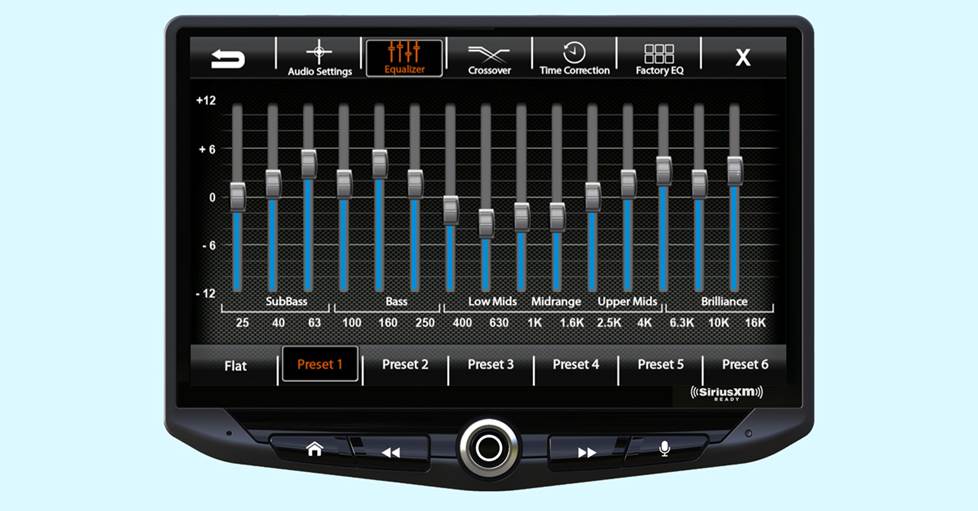
A custom EQ curve like this is a strong starting point for factory speakers.
Image source: www.crutchfield.ca
From here, trust your ears. If the low end sounds boomy, lower the 60 Hz band to +2 dB. If voices feel recessed, raise the 910 Hz band to +1 dB. Small 1 dB changes are easier to judge than large swings.
An example of an EQ curve that was tuned by ear and shared online.
Image source: www.reddit.com
How Your Car's Interior Changes the Sound
Two identical cars with identical stereos can sound different because of cabin shape, trim level, and speaker placement.
Small Cars and Hatchbacks
Tight cabins concentrate bass energy, which is why small cars often sound punchy but boomy. Cut the low-mid band slightly and keep the deep bass boost modest.
Sedans
Sedans generally have more balanced acoustics, but rear speakers are farther from the driver. A slight fader adjustment or time alignment helps more than a big EQ swing.
SUVs and Vans
Larger cabins create more mid-bass reflections and sometimes a hollow, echoing quality. Reducing 230–500 Hz and adding a little presence around 3 kHz often cleans things up.
Convertibles
Open roofs erase deep bass and add wind noise. Top-down driving usually needs a small bass boost and a treble cut to counter road noise, while top-up driving should use a flatter curve. Save two separate presets if your stereo allows it.
Trucks
Crew cabs have unusual shapes and often overemphasize low mids. The fix is usually a cut around 200–400 Hz plus careful fader tuning rather than adding more bass.
Fixing Common Car Audio Problems with EQ
Equalizers can fix many tonal issues, but they cannot fix every problem. Here is how to tell the difference.
Muddy or Muffled Sound
This is almost always too much energy in the 200–500 Hz range. Cut these bands by 1 to 3 dB before you do anything else. If music still sounds blurred, check your source quality—a low-bitrate stream will stay muddy no matter how good the EQ curve is.
Harsh or Hissy Treble
Reduce 4–8 kHz, not the highest band. Many people cut 14 kHz while leaving 5 kHz untouched, which does nothing to tame harsh vocals. Also check whether your phone's "spatial audio" or "soundcheck" features are altering the signal.
Rattling Doors and Trims
EQ cannot fix physical rattles. A rattling door often needs a small cut at the frequency of the rattle, but the real solution is to remove loose items, tighten trim, or add sound-deadening material. Loose coins and debris under seats buzz at certain bass notes and confuse your tuning. Cleaning under the seats is a quick fix that is easy to overlook.
Weak or Distant Vocals
Boost around 1–2 kHz by 2 dB before you try boosting the entire midrange. Vocal presence lives in a narrow band, and over-broad mid boosts make everything louder without making vocals clearer.
Distortion at Moderate Volume
This is not an EQ problem. If speakers crackle or clip before you reach your normal listening level, the speakers may be damaged, underpowered, or receiving too much boost. Lower all EQ bands toward zero and test again. If distortion remains, improve the source file or upgrade speakers.
Low-Volume Sound Is Thin
When the volume is low, human hearing naturally loses bass and treble. A slight "loudness contour" or bass boost for low-volume listening is acceptable, but save it as a separate preset rather than baking it into your main curve.
Modern Audio Processing in 2026: Auto EQ, Time Alignment, and DSP
Equalizers are no longer just a row of sliders. Many 2026 model-year head units and factory sound systems include digital signal processing, automatic room correction, and time alignment.
Auto EQ and Onboard Calibration
Some aftermarket stereos use a small microphone to play test tones through your speakers and generate an automatic EQ curve. This can be useful for removing major peaks and dips. In practice, the result is often flat and slightly lifeless, so treat it as a starting point and add a gentle musical curve afterward.
Time Alignment
Time alignment delays each speaker so sound from different distances arrives at your ears at the same moment. This reduces smearing and can make a bigger difference than EQ, especially in cars with door speakers far away from the driver.
Source-Dependent EQ
Modern stereos let you save separate EQ settings for USB, Bluetooth, radio, and Android Auto or Apple CarPlay. That matters because Bluetooth already applies its own compression. Keep separate curves rather than forcing one setting on every input.
Advanced Techniques for Better Sound
If you want to go past simple bass, mid, and treble adjustments, these techniques help you understand what you are hearing.
Use Pink Noise and an RTA App
A real-time analyzer app on your phone can show you which frequencies are too loud or too quiet inside the cabin. Phone microphones are not accurate, so use it as a rough map, not gospel. Set the EQ to flat, play pink noise, and see where the response spikes. Your ears should always be the final judge.
Keep Boosts Under 6 dB
Every boost increases the demand on your amplifier. Boosting by more than 6 dB at any band risks clipping, speaker strain, and harsh sound. If a band needs more than 6 dB, something else is wrong—usually speaker placement, crossover, or source quality.
Use High-Pass Filters
If your system has a crossover, set a high-pass filter on smaller door speakers at 60–80 Hz. This reduces distortion and lets them play mids and highs more cleanly. It sounds counterintuitive, but cutting deep bass at the door speakers can make the whole system sound tighter.
Avoid the "Smiley Face" Trap
A huge V-shaped curve—bass and treble cranked, mids cut—looks exciting on screen but sounds exhausting. It buries vocals and forces you to raise the volume to hear detail. A better curve is a gentle tilt, not a crater.
Upgrade the Weakest Link
EQ cannot restore detail that was never recorded or that the speakers cannot reproduce. If your system sounds harsh no matter what you do, the speakers or source files may be the bottleneck. That is worth remembering before you spend hours fighting an EQ that is being defeated by a 96 kbps stream.
Common Equalizer Mistakes to Avoid
Many tuning attempts fail because of these habits:
- Boosting every band because "louder sounds better." More gain means more heat in your system, not better music.
- Tuning at one volume only. A curve that sounds good at low volume often unravels at highway volume.
- Using mp3s or streams as the only reference. If you judge a song after it has been heavily compressed, the EQ curve will be full of corrections for artifacts the file itself created.
- Forgetting the subwoofer is on. A separate subwoofer level interacts with the EQ, so set the subwoofer gain first, then dial in the head unit EQ.
- Comparing to a home stereo in a different room. Your car has a tiny, reflective cabin. Aim for a pleasant, balanced in-car sound rather than replicating a living room.
- Ignoring balance and fader. No EQ will fix a system that is heavily weighted to one side.
When to Call a Professional
Most drivers can improve their sound considerably with the steps above. But there are cases where professional help is worth it:
- Your system has active crossovers, multiple amplifiers, and components, and you are not comfortable with signal routing.
- The sound still distorts or fatigues you no matter what EQ curve you use.
- You want a calibrated microphone measurement and a final curve that accounts for your specific car's acoustics.
A professional mobile installer uses measurement gear and experience to set levels, crossovers, time alignment, and EQ as a complete system. It is the right move for serious systems, but only after you have already fixed the basics: source quality, speaker condition, and physical rattles.
Frequently Asked Questions
What Is the Best Equalizer Setting for Car Stereo?
There is no universal setting because every car and speaker system is different. A reliable starting point is a 5-band curve around +3 dB at 60 Hz, -1 dB at 230 Hz, 0 dB at 910 Hz, +2 dB at 3.6 kHz, and +1 dB at 14 kHz. Then adjust until vocals sound natural, bass feels even, and cymbals are crisp without being harsh.
Should I Use Presets or Custom EQ?
Presets are a useful starting point, but they are made for an imaginary average car. Custom settings almost always sound better because they can address your specific cabin's peaks and dips.
Can an Equalizer Fix Distortion?
No. EQ can reduce the frequencies that make distortion obvious, but the distortion itself is usually caused by clipping, damaged speakers, or a gain staging problem. Turn the EQ down first, then investigate the hardware.
Why Does My Car Sound Boomy While My Home Stereo Does Not?
Car cabins are small and enclosed, which creates a natural boost in the low frequencies. That is why a home stereo curve does not translate directly to a car. A cut in the 200–500 Hz range usually reduces the "boom" without removing true bass.
Do Bluetooth and USB Sound Different With the Same EQ?
Yes. Bluetooth applies lossy compression and a different signal path than a wired USB connection. Many head units let you save source-specific EQ settings, and that is worth using if you regularly switch between phone and USB.
What Do I Do If My Head Unit's EQ Menu Is Hard to Navigate?
Check the owner's manual or the stereo's settings menu. If the interface language is confusing, you can often find the correct menu by following the layout rather than guessing. Some units also support control from a phone app, which is far easier to use than tiny on-screen sliders.
Conclusion
The best equalizer setting for a car stereo is the one that makes your music sound natural in your car, not on someone else's benchmark chart. Start flat, use familiar reference songs, tune the bass and treble in small steps, and pay extra attention to the midrange where vocals and instruments live. Then test at different volumes and save your curve before it disappears after a battery reset.
You now have everything you need to do it yourself. Open your stereo's EQ menu, reset it to flat, pick three songs you know well, and walk through the steps above. The difference will usually be obvious within ten minutes—and it costs nothing. If you want to keep improving your setup, our other car audio and interior guides are a good place to continue.

Leave a Reply