
If you’ve started shopping for a car stereo, you’ve probably seen the term “double DIN” and wondered what it actually means. It’s not a brand, a feature, or a type of sound system. It’s a standard dashboard size that determines which head units will physically fit in your car.
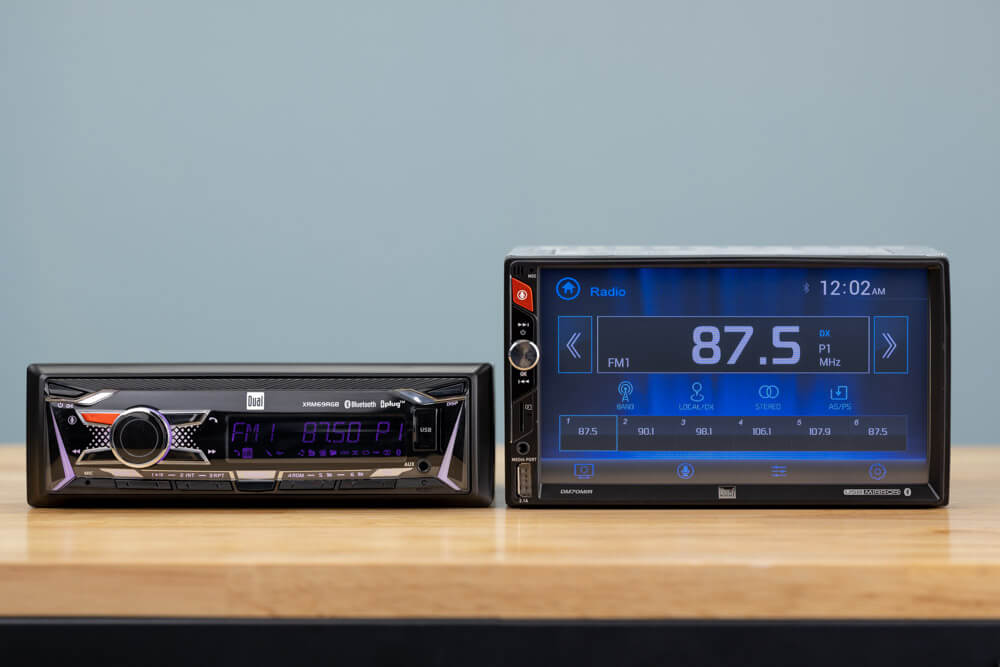
A double DIN stereo is roughly 7 inches wide and 4 inches tall — twice the height of a single DIN unit. That extra space makes room for large touchscreens, Apple CarPlay and Android Auto, built-in navigation, backup camera support, and more advanced audio processing. In 2026, double DIN is the default size for most modern cars, and it’s also the most popular upgrade path for older vehicles. For more on this, see our guide on single din vs double din car stereo.
This guide covers what double DIN means, how it compares to single DIN, which cars can fit it, what features are worth paying for, and how to avoid the most common upgrade mistakes.
What Does “DIN” Actually Mean?
DIN stands for Deutsches Institut für Normung — the German Institute for Standardization. It’s the organization that originally defined the physical size of car radios, and the term is still used today across the entire car audio industry. You can read more about the organization’s standards work directly from the German Institute for Standardization.
The standard is simple:
- Single DIN: 180 mm × 50 mm (about 7 × 2 inches)
- Double DIN: 180 mm × 100 mm (about 7 × 4 inches)
The width is the same. The height is doubled. That’s where the “double” comes from.
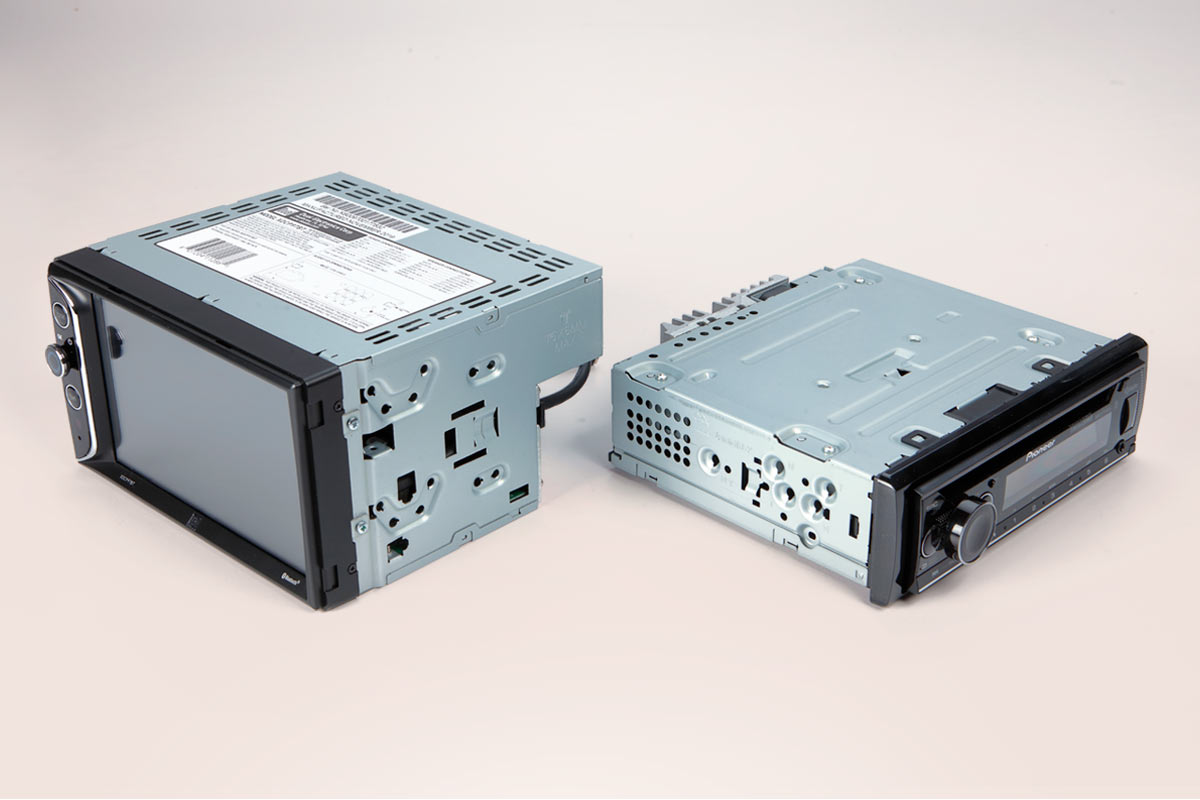
Depth is not part of the DIN standard. A double DIN unit can be deeper than an older single DIN radio, which means the space behind your dashboard matters just as much as the opening itself. In practice, most double DIN units are shallow enough for standard vehicles, but some cars with tight dashboards need extra attention.
Double DIN vs Single DIN: Key Differences
| Feature | Single DIN | Double DIN |
|---|---|---|
| Height | 2 inches (50 mm) | 4 inches (100 mm) |
| Width | 7 inches (180 mm) | 7 inches (180 mm) |
| Screen | Small display or no screen | 6–10 inch touchscreen common |
| Typical features | AM/FM, Bluetooth, basic audio | CarPlay/Android Auto, navigation, video, camera inputs |
| Best for | Older vehicles, basic upgrades | Modern dashboards, feature-rich upgrades |
The size difference is not cosmetic. A double DIN unit has more internal room for a better display, faster processor, and more powerful audio hardware. That’s why nearly every head unit with wireless smartphone integration or built-in navigation uses a double DIN chassis.

A double DIN head unit uses the extra height for a large touchscreen and more controls.
Credit: www.amazon.com
Why Choose a Double DIN Stereo?
Drivers choose double DIN stereos for practical reasons, not just looks.
- Large touchscreen display: Most double DIN units have screens between 6 and 10 inches. That makes maps, music, and vehicle settings much easier to read while driving.
- Smartphone integration: Wireless Apple CarPlay and Android Auto are now common, so you can use your phone’s apps through the car’s screen without touching your phone.
- Better sound quality: Double DIN units typically include graphic equalizers, crossover controls, and support for high-resolution audio files.
- Backup camera support: Most models have a dedicated camera input, which makes parking safer and easier.
- Built-in navigation: Some units include offline GPS maps, which is useful in areas with poor phone signal.
- More customization: Extra outputs and ports make it easier to add amplifiers, subwoofers, and additional cameras.
The honest trade-off is price and installation complexity. Double DIN units cost more than single DIN units, and they often require wiring adapters, dash kits, and programming modules. For most drivers, the convenience and safety benefits are worth it.
Key Features to Look For in 2026
Not all double DIN stereos are created equal. The cheapest models can feel slow and frustrating, while premium units offer a genuinely modern experience. Here’s what actually matters in 2026:
| Feature | Why It Matters |
|---|---|
| Wireless CarPlay / Android Auto | No cables, safer access to maps and apps |
| Display quality | IPS or OLED panels with anti-glare and high brightness |
| Bluetooth | Hands-free calls and reliable audio streaming |
| Camera inputs | Backup camera, dash cam, or front camera support |
| Audio tuning | Graphic EQ, crossover, and time alignment |
| USB-C ports | Fast charging and stable phone connections |
| Software updates | Fixes bugs and adds compatibility with newer phones |
Using a phone while driving is dangerous. The National Highway Traffic Safety Administration publishes clear guidance on distracted driving, and a head unit with wireless phone projection is one of the best ways to reduce the temptation to reach for your phone.
In 2026, wireless CarPlay and Android Auto are no longer luxury features. They appear on many mid-range double DIN units, and they’re worth prioritizing if you use navigation or streaming apps regularly.
Will a Double DIN Fit in Your Car?
The first question to answer before buying anything is whether your car has a double DIN opening. Here’s how to check:
- Measure the dashboard opening. If the space is about 7 inches wide and 4 inches tall, it will accept a double DIN unit.
- Check your owner’s manual. Many manuals list the stereo size or show the dashboard layout.
- Look up vehicle-specific fitment. Car audio forums and manufacturer sites often have compatibility details for your exact year and trim.
- Check the depth behind the dash. A double DIN unit needs enough clearance for its chassis, wiring, and connectors.
- Ask a professional. A local car audio shop can confirm fitment and tell you which dash kit you need.
A common mistake is measuring only the visible trim piece. The actual metal opening behind the dashboard is what matters. Some cars have a single DIN opening that can be modified to fit double DIN with a special dash kit, but not all vehicles have enough depth or clearance.
Single DIN (top) and double DIN (bottom) dash openings compared.
Credit: www.dualav.com
Installation: DIY or Professional?
Installing a double DIN stereo is more involved than swapping an old radio. In most cars, you’ll need more than just the head unit itself.
Wiring Harnesses and Data Interfaces
Modern vehicles often use a data bus to control the radio, steering wheel buttons, and factory warning chimes. To keep those features working, you may need a wiring harness adapter or a data interface module. Without it, you could lose steering wheel controls, backup sensor warnings, or door chime sounds.
Dash Kits and Trim
A double DIN unit rarely fits perfectly into a factory opening without a dash kit. The kit fills the gaps around the unit and matches the dashboard trim. For some cars, the kit is simple plastic; for others, it includes brackets and mounting hardware.
Tools and Time
You’ll typically need screwdrivers, trim removal tools, wire strippers, and electrical tape or heat-shrink connectors. A straightforward installation takes one to three hours. Adding a backup camera, steering wheel control module, or amplifier can easily double that time.
If you’re comfortable with wiring and vehicle trim, DIY installation can save money. If you’re not, professional installation is worth the cost. A bad install can damage your car’s electrical system or leave you with a stereo that doesn’t turn off with the ignition.
Common Mistakes to Avoid
- Guessing the size instead of measuring. Always measure the actual opening before ordering.
- Ignoring mounting depth. A unit can fit the opening but still hit a duct or wiring harness behind the dash.
- Forgetting wiring adapters. Buying a stereo without the correct harness means the install stops before it starts.
- Choosing no-name brands. Cheap units often have poor touchscreens, weak Bluetooth, and no software support.
- Skipping software updates. Some double DIN units need firmware updates to work with newer phones. If you skip them, CarPlay or Android Auto may stop connecting.
- Not planning for accessories. If you want a backup camera, buy a unit with a camera input and run the wiring while the stereo is already out.
A non-obvious insight: some double DIN units require updates shortly after installation because phone operating systems change frequently. A brand with a reliable update process is worth more than a slightly better screen.
Cost and Value
Double DIN stereos range from budget-friendly to genuinely expensive. Here’s what you can expect in 2026:
| Tier | Typical Price | What You Get |
|---|---|---|
| Entry | $100–$200 | Basic touchscreen, Bluetooth, sometimes wired CarPlay |
| Mid-range | $250–$600 | Wireless CarPlay/Android Auto, better display, camera input |
| Premium | $700+ | High-res display, navigation, advanced audio tuning, vehicle integration |
The sweet spot for most drivers is the mid-range tier. That’s where you get wireless smartphone integration, a responsive touchscreen, and solid audio controls without paying for features you’ll never use.
If you only listen to the radio and connect your phone with an aux cable, a single DIN unit may be enough. But if you want navigation, hands-free calls, and a modern interface, a double DIN unit offers far better value for the money.
Pros and Cons
| Pros | Cons |
|---|---|
| Large touchscreen display | Higher price than single DIN |
| Smartphone integration | More complex installation |
| Better sound processing | Not every car has the space |
| Backup camera support | Some features need extra modules |
| More dashboard options | Needs a proper dash kit for a clean look |
The biggest advantage is usability. A large, responsive screen with wireless phone integration makes everyday driving more convenient and safer. The biggest disadvantage is that installation is rarely plug-and-play, especially in newer cars with complex electrical systems.
Real-Life Upgrade Example
Imagine a 2012 sedan with a factory single DIN radio. The owner wants Bluetooth, navigation, and a backup camera without buying a new car.
After measuring the dash, they confirm the opening is double DIN. They choose a 7-inch unit with wireless Apple CarPlay, a backup camera input, and a decent graphic equalizer. The installation includes a dash kit, a wiring harness adapter, and a steering wheel control module.
Once installed, the car now has:
- Maps and traffic information on the touchscreen
- Hands-free calls through the factory microphone location
- Music streaming from a phone without cables
- A clear rear view when parking
- Better sound from the factory speakers thanks to the new equalizer
This is the most common double DIN upgrade path. An older car gains modern features without changing its character or requiring a full audio system rebuild.
A finished double DIN installation keeps the dashboard looking factory-fitted.
Credit: www.crutchfield.com
Extra Tips for Choosing the Right Unit
- Read owner reviews, not just spec sheets. Real-world feedback often reveals slow software, poor Bluetooth range, or glare issues that specs don’t show.
- Check the firmware update policy. Some brands release updates regularly; others abandon their units quickly.
- Look at the display in person if possible. Brightness and viewing angle matter more than resolution on paper.
- Confirm phone compatibility. Make sure the unit supports your phone’s current version of CarPlay or Android Auto.
- Think about future add-ons. If you might add a dash cam or amplifier later, choose a unit with enough inputs and outputs.
- Plan for the little things. If the unit arrives set to the wrong language, you can usually switch the display language from the settings menu.
Once the stereo is installed, you’ll probably spend more time in the car, so it’s worth keeping the cabin clean. That starts with choosing a vacuum for the cabin that can handle crumbs and dust. If you’re not sure how strong a unit needs to be, check how much suction you actually need. For quick cleanups, a compact vacuum is enough. And if you want to avoid buying the wrong tool, focus on the features that matter most.
Frequently Asked Questions
What is the main difference between double DIN and single DIN stereos?
A double DIN stereo is twice as tall as a single DIN unit. That extra height allows for a large touchscreen, smartphone integration, navigation, and better audio processing. Single DIN units are smaller and more basic.
Can I install a double DIN stereo in any car?
No. Your car’s dashboard must have an opening about 7 inches wide and 4 inches tall. Some cars with single DIN openings can be modified with a dash kit, but depth and wiring compatibility also matter.
Do double DIN stereos improve sound quality?
Yes, in most cases. Double DIN units typically include better digital signal processors, graphic equalizers, and support for high-quality audio files. They also make it easier to add amplifiers and subwoofers.
Are double DIN stereos expensive?
Prices vary widely. Entry-level units start around $100, but most quality models with wireless CarPlay and Android Auto cost between $250 and $600. Premium units with navigation and advanced audio controls can cost over $1,000.
Is it hard to install a double DIN stereo?
It can be tricky, especially in modern cars with data bus systems. You may need wiring adapters, a dash kit, and a steering wheel control module. Many drivers choose professional installation to avoid electrical damage and ensure everything works correctly.
Conclusion
A double DIN car stereo is the easiest way to bring a modern, connected interface into almost any vehicle. It gives you a larger screen, safer smartphone integration, better sound, and support for useful extras like backup cameras. The key is to choose a unit that fits your car, matches your needs, and comes from a brand that supports its products with updates.
Before you buy, measure your dashboard opening, list the features you’ll actually use, and read a few owner reviews. Do that, and your next drive will feel noticeably better. For more practical car audio advice, browse our car audio hub.

Leave a Reply